CinemaStudio AI Review
A Serious AI Filmmaking Tool Or Just Hype?

What Is CinemaStudio AI?
CinemaStudio AI is a story-first AI movie creation platform that helps you turn a single idea, script, or ready-made concept into cinematic short films, trailers, and series in minutes.
It gives you the tools to create the kind of polished, story-driven videos that can grab attention, keep viewers watching, and make your content look far more premium. From writing and character creation to storyboarding, scene generation, narration, dialogue, music, and editing, the platform handles the heavy production work in one place.
Key capabilities include:
▶ AI screenwriting and story development from one idea or your own script.
▶ Consistent characters and cast across multiple scenes.
▶ Director-mode controls for camera angles, pacing, visual style, and cinematic direction.
▶ Shot-by-shot storyboarding and scene generation with narration, dialogue, sound, and music.
▶ Ready-made templates across 10 story categories to help you create faster.
How CinemaStudio AI Works In 4 Steps
- Step #1: Select Your Story
Pick a ready-made template, generate a fresh concept with AI, paste your own script, or start from one simple idea.
- Step #2: Customize & Direct
Create your characters and control the language, format, pacing, visual style, and cinematic direction so the final video matches the look you want.
- Step #3: Produce Your Film
CinemaStudio AI turns your direction into a complete shot-by-shot production, generates the storyboard and scenes, then adds dialogue, narration, audio, and music inside the editor.
- Step #4: Publish & Monetize
Export your finished movie for YouTube, TikTok, Instagram Reels, and other platforms. Use it to attract viewers, promote offers, build content channels, or sell cinematic video creation as a service.
CinemaStudio AI Features At A Glance
CinemaStudio AI packs the major parts of movie creation into one platform, giving you control over the story, cast, visual direction, audio, editing, and final output.
Here’s a closer look at what you can do inside:
✅ Idea-To-Film Story Engine
Start with just one line of text, and CinemaStudio AI can develop it into a complete cinematic script with a clear beginning, an engaging twist, and a proper ending. This gives you a much faster starting point for creating a film without having to write an entire screenplay yourself.
✅ 100s Of Done-For-You Templates
Jump-start production with ready-made film templates across 10 blockbuster categories and more than 100 sub-genres. Choose a direction, drop in your idea, and move straight into creating your film without starting from a blank page.
✅ Star In Your Own Movie
Upload one photo and place yourself directly into your movie as the main character. CinemaStudio AI keeps the same face and wardrobe from shot to shot, helping your character stay recognizable throughout the story.
✅ 20 Stunning Visual Styles
Give every movie the look you want with 20 different visual styles, including Cinematic Realistic, Anime, 3D, Watercolour, Cyberpunk, and more. Combined with the available creative options, you get up to 400 ways to shoot the same story and can give one concept a completely different visual identity.
✅ Hollywood Director Mode
Take greater control over how every scene looks with professional camera, lighting, and color-grading presets. Choose cinematic treatments such as Golden Hour, Rembrandt, and Teal & Orange, or simply leave Director Mode on Auto and let the platform make those decisions for you.
✅ Go Global With 20 Languages
Create narration and character dialogue for audiences around the world. CinemaStudio AI supports 20 languages, including English, Spanish, Hindi, Arabic, Chinese, and 15 more, giving your films much wider reach.
✅ Cater To Any Audience
Match your movie to the people you want to reach by choosing from Kids, Teens, Adults, or Family audience settings. You can also select from 9 emotional tones, ranging from Funny to Suspenseful, so the mood of the story fits the viewing experience you want to create.
✅ Shot-By-Shot Storyboard
See how your movie will unfold before the scenes are rendered. The storyboard displays every frame and gives you the freedom to edit any line, add another shot, or regenerate individual scenes, giving you much more control over the final production.
✅ AI Voice, Score & Sound
Bring your scenes to life with built-in audio production. CinemaStudio AI can add narration, character dialogue, and a cinematic soundtrack composed to match each scene, helping the finished film feel far more complete and immersive.
✅ Character Design Studio
Create your own original characters and generate a 4-pose character sheet to establish their appearance. Once created, those characters can be reused across other films, making it easier to develop recurring casts, stories, or series.
✅ Universe Design Studio
Go beyond individual characters and create an entire reusable world for your stories. Define its environment, lighting, and atmosphere, save that universe, and bring it back whenever you want to produce another film within the same visual setting.
✅ Full Timeline Editor
Fine-tune the finished production directly from your browser. The integrated timeline lets you trim scenes, rearrange them, and add voice, music, and captions without needing separate video editing software.
✅ 1080p Watermark-Free Renders
Export your finished movies in 1080p without a watermark, giving you broadcast-grade output ready for YouTube, TikTok, Instagram, advertising campaigns, client work, and other professional uses.
✅ Every Format, Every Platform
Create content in the format your platform needs. CinemaStudio AI supports vertical, widescreen, and square videos, with lengths ranging from 15 seconds to 90 seconds, making it suitable for everything from quick social clips to longer cinematic stories.
✅ 2,500 Video Credits Every Month
Your account includes 2,500 video credits every month to keep your production pipeline moving. During the launch, access comes with a one-time payment with no subscription fees, making this especially attractive for creators planning to produce videos regularly.
✅ Cloud Project Library
Keep your creative assets organized online. Every film, cast, and universe can be saved inside your cloud project library, ready to access again whenever you need them. There’s also nothing to download or install, since the platform works through the cloud.
✅ Commercial License Included
CinemaStudio AI also opens up a direct service opportunity. The included commercial license allows you to create and sell films to clients while keeping 100% of what you charge, adding a practical monetization angle beyond creating content for yourself.
✅ 30-Day Money-Back Guarantee
You’re also covered by a 30-day money-back guarantee, giving you time to explore the platform, create some films, test the workflow, and decide whether CinemaStudio AI fits your needs.
CinemaStudio AI Step-By-Step Software Walkthrough
This walkthrough takes you through the CinemaStudio AI workflow from your first concept all the way to a finished movie. Complete the core film-building stages in order, then move into Series Maker and the additional creative or publishing tools whenever you want to expand the project further.
[+] Start In Film Studio
Select Film Studio from the left-hand menu to open the main filmmaking workspace. Here, you can launch a fresh project, check the available templates, or look through existing examples for ideas before starting your own production.
[+] Choose Your Story Starting Point
Pick a ready-made story or template, or start with an original idea you already have in mind. Choose the option that best matches the type of movie you want to produce, then move forward to the main project setup:
[+] Select Your Characters
Enter the character selection area to browse existing characters, pull in previously saved ones, or create a brand-new character. Add the key cast members you want CinemaStudio AI to keep visually consistent across the entire film:
[+] Create The Character Look
Use the character creation panel to define the name, appearance, clothing, personality, and other visual traits. You can also upload reference images, then click Generate Preview to check the character’s look before placing them into your film:
[+] Build Your World And Locations
Open Worlds & Locations to create the setting where your story takes place. Adjust the environment, lighting, atmosphere, location style, and other visual details, then generate a preview to lock in a more consistent look across the movie:
[+] Enter The Story And Creative Settings
Enter your concept under The Story You Want to Tell, or click Generate idea to let AI help you develop a starting point. Next, choose the visual style, emotional tone, target audience, narration style, narrator voice, spoken language, video format, and music mood.
[+] Add Or Parse A Full Script
Already have a finished screenplay? Open Paste your script and add it directly to the editor. Use Sample format whenever you want to check the recommended structure, then click Parse Script so CinemaStudio AI can break the screenplay into production-ready scenes. Complete this step by choosing Create Story Draft
[+] Lock The Cast And Visual World
Check the characters assigned to your draft and lock any appearances you want to keep consistent. You can also bring characters in from your library, choose the right world or location, and select a video model based on the quality level and credit usage you prefer. Once everything looks right, click Create Story Draft:
[+] Refine The Storyboard
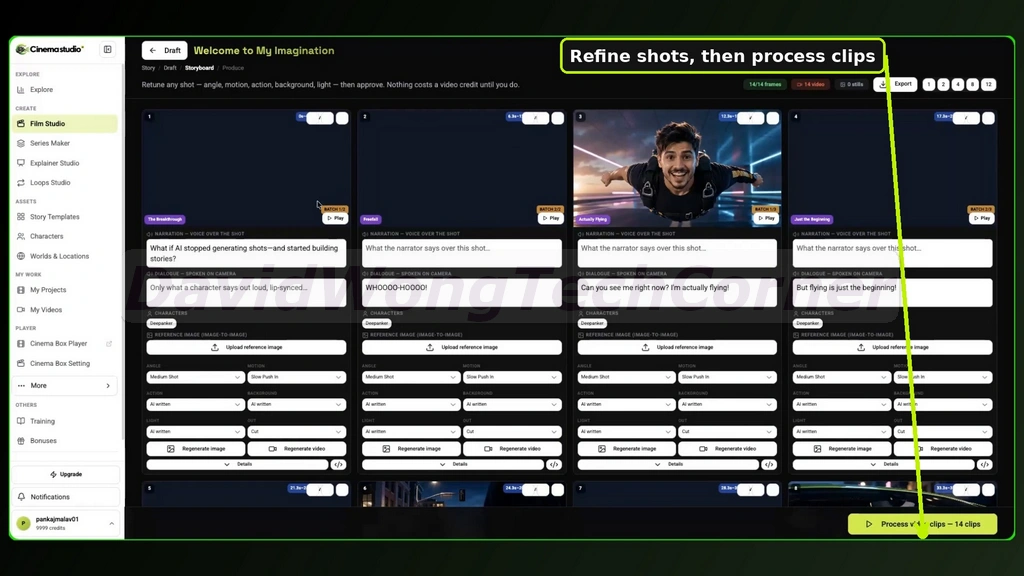
Review your storyboard one shot at a time before generating the finished video clips. Fine-tune the narration, dialogue, character references, camera angles, movement, actions, backgrounds, lighting, and transitions as needed. You can regenerate individual frames or clips without changing the rest of the sequence. When the storyboard is ready, click Process video clips.
[+] Edit The Finished Film
Open the production editor to preview the assembled movie and make your final adjustments. Use the timeline to rearrange scenes, fine-tune voice and music tracks, add assets from the media library, and adjust the timing. Choose your preferred aspect ratio at the top, then click Save or Export once the movie is finished:
[+] Create A Series
Select Series Maker from the left menu, then click Create Series. Start a completely new episodic production or continue from a film you have already created, allowing you to carry the same characters, locations, and visual identity into multiple episodes.
[+] Define The Series Rules
Describe the world of your series and set the storytelling rules you want the AI writer to follow. These guidelines can cover continuity, suspense, character development, world-building, plot twists, and emotional progression. You can also choose how each episode should end before clicking Next.
[+] Set The Recurring Cast And Look
Set the background, lighting, colour grade, and overall atmosphere you want to maintain throughout the series. Click Choose cast to add recurring characters, then include any locations, objects, or visual elements that should stay recognizable across future episodes. Click Next once the recurring series identity is ready.
[+] Choose How Episodes Are Produced
Choose between direct video generation and a storyboard-first production workflow. You can create episodes one at a time or generate them in sequence, add an opening trailer, and decide whether cover titles should appear. Review the estimated credit requirement, then click Write the episodes.
[+] Review And Manage The Episodes
Open the completed series workspace to see the generated episode cards and individual story plans. Check the titles, episode order, narrative progression, and controls available for each installment before moving them into production or making additional changes.
[+] Configure Cinema Box Publishing
Open Cinema Box Setting when you want to prepare a movie or series for publishing through the Cinema Box experience. Choose the content type, genres, tags, language, country, age rating, and any appropriate content warnings. Complete the title, synopsis, poster, and visibility details, then proceed with publishing.
[+] Create A Seamless Loop
Open Loops Studio and describe the opening frame, the movement you want during the clip, and how the final frame should transition naturally back to the beginning. Select your preferred format and generation model, then click Generate Loop to create a smooth, continuously repeating video.
For a full walkthrough, please watch my review & demo video below:
CinemaStudio AI Funnel Breakdown
FRONT END: CinemaStudio AI Commercial ($37)
Add my code “EARLY10” to get 10% off the front-end.
The CinemaStudio AI Front-End gives you the core movie-making system needed to turn ideas and scripts into polished cinematic videos from one dashboard.
What you get inside the front-end offer:
✅ AI Cinematic Story Engine with 2,500 Video Credits Every Month
✅ 100s of DFY Film Templates: 10 story categories, 100+ sub-genres & 1,000s of possible video combinations
✅ Creative Visual Control: 20 visual styles including Cinematic, Anime, 3D & more, plus Hollywood camera, lighting & colour presets
✅ Global Voice Production: 20 spoken languages for narration & dialogue
✅ Audience & Story Targeting: Kids, Teens, Adults & Family audiences
✅ Flexible Film Creation: Create videos from 15 to 90 seconds in vertical, widescreen & square formats
✅ Custom Character & Universe Creation: Design up to 5 custom characters and 5 custom universes
✅ Paste Your Own Script: Bring in your existing screenplay or story and turn it into a cinematic production.
✅ Shot-By-Shot Storyboard Preview: Review every scene before rendering and refine the flow of your movie.
✅ AI Voiceover, Music & Sound: Add narration, dialogue, background music, and sound directly inside the platform.
✅ Browser-Based Timeline Editor: Trim, arrange, and fine-tune your finished movie without separate editing software.
✅ HD Watermark-Free Renders: Export clean, professional-looking videos ready for publishing or client use.
✅ Facebook & Instagram Posting and Scheduling: Publish or schedule your finished content directly to supported social platforms.
✅ Commercial License, Step-By-Step Training & Support, and 30-Day Money-Back Guarantee Included
>>>Click here to buy CinemaStudio AI front-end<<<
BUNDLE: CinemaStudio AI Bundle Offer ($317 => $267)
Add my code “CINEMA50” to get $50 off the Bundle.
The CinemaStudio AI Bundle gives you the front-end version plus all OTOs in one complete package.
You can unlock the full filmmaking, series creation, streaming, and additional content-production ecosystem without purchasing each offer separately.
The bundle includes:
🔰 Front-End: CinemaStudio AI Commercial (currently priced at $37)
🔰 OTO #1: CinemaStudio AI Unlimited Pro (currently priced at $67)
🔰 OTO #2: Cinema Studio Series (currently priced at $47)
🔰 OTO #3: CinemaBox (currently priced at $67)
🔰 OTO #4: Loop StudioAI (currently priced at $67)
🔰 Advanced upgrade training & all bonuses
>>>Click here to buy CinemaStudio AI Bundle<<<
Now let’s check the details of each OTO offer:
OTO 1: CinemaStudio AI Pro ($67 | One-time payment)
CinemaStudio AI Unlimited Pro is the upgrade for users who want more creation capacity, longer films, fewer restrictions, and faster production.
What you get inside OTO 1:
✅ Extra Video Credits: Add another 2,500 video credits to your account for higher monthly production volume.
✅ Longer 3-Minute Films: Create films up to 3 minutes long, giving you around 2x more runtime than the standard version.
✅ Expanded Story Library: Unlock all 20 story categories, including 10 additional categories beyond the Front-End.
✅ Unlimited Characters & Universes: Create as many custom characters and reusable story worlds as you need.
✅ Pro Director Controls: Unlock 16 environments plus advanced lighting and colour-grade options for stronger cinematic control.
✅ Unlimited Projects, Renders, Exports and Uploads with No Daily Generation Limit
✅ 10x Faster Priority Rendering & 5x Cloud Storage
✅ Team Access: Add up to 5 team members to work inside your account.
>>>Click here to buy CinemaStudio AI OTO 1<<<
OTO 2: Cinema Studio Series ($47 | One-time payment)
Cinema Studio Series is designed for creating connected episodic content with the same cast, world, visual identity, and storyline carried across multiple episodes.
What you get inside OTO 2:
✅ Series Maker: Build an ongoing series with one consistent cast, world, and visual look across every episode.
✅ AI Season Writer: Turn one idea into a connected season of 3 to 12 episodes.
✅ Series Bible & Continuity System: Keep cast, environments, visual style, places, and important objects consistent throughout the series.
✅ Recurring Character Support: Pull characters directly from your existing Character Library and reuse them across episodes.
✅ Story Rules & Ending Controls: Apply 6 series rules and choose from 5 ending styles, including Cliffhanger and Mystery Box.
✅ Hands-Free Season Production: Produce the entire season back-to-back and add new episodes whenever you want.
✅ Flexible Episode Creation: Make 30, 60, or 90-second episodes in all supported formats and 20 languages.
✅ 20+ Series Genres: Create Brand Stories, Testimonials, Podcasts, News-style series, and many other formats.
✅ Series Room: Manage each episode with its own mood board, editor, and rendering controls.
✅ Turn Existing Films Into Series: Use any movie you already created in Cinema Studio as the starting point for a new series.
✅ Automatic Series Promotion: Generate cinematic posters with titles plus series trailers in 4 different styles.
✅ 100 Done-For-You Series Blueprints: Start faster with ready-made concepts and structures for different series types.
✅ Series Marketing Resources: Get the Series Selling Kit, Binge Channel Playbook, and poster templates.
✅ Full Cinema Studio Compatibility: Use the upgrade directly with your existing Cinema Studio AI workflow.
✅ Commercial License Included: Create and sell episodic video content to clients.
>>>Click here to buy CinemaStudio AI OTO 2<<<
OTO 3: CinemaBox ($67 | One-time payment)
CinemaBox gives you your own branded streaming platform, allowing you to publish, organize, grow, and monetize your video content from one place.
What you get inside OTO 3:
✅ Branded Streaming Platform: Launch your own Netflix-style video platform under your brand.
✅ Unlimited Channels, Series & Seasons: Organize as much content as you want without being restricted to a single channel or series.
✅ Multiple Platforms Per Account: Create and manage more than one streaming platform from the same account.
✅ One-Click Cinema Studio Publishing: Send completed films directly from Cinema Studio into CinemaBox.
✅ Upload Your Own Videos: Add films or content created outside Cinema Studio as well.
✅ Multiple Viewing Experiences: Give viewers a YouTube-style player, responsive desktop layout, and a mobile swipe feed similar to Reels or TikTok.
✅ Binge-Watching Features: Enable auto-play for the next episode and let viewers save content to a watchlist.
✅ Shareable Content Links: Share links to your entire platform, an individual channel, or a specific film.
✅ Viewer Accounts & Community Features: Allow sign-ups, likes, comments, replies, shares, channel follows, and new-episode alerts.
✅ Free, Private & Paid Access: Decide who can watch your content and how they gain access.
✅ Subscriptions & Pay-Per-View: Monetize content through recurring monthly memberships or individual purchases.
✅ Built-In Advertising Tools: Add custom banner ads, in-feed video ads, and clickable CTA buttons.
✅ Ad Manager: Schedule advertising campaigns and track their performance.
✅ Viewer & Engagement Analytics: Monitor how people watch and interact with your content.
✅ Commercial License Included: Create streaming platforms and related services for paying clients.
>>>Click here to buy CinemaStudio AI OTO 3<<<
OTO 4: Loop StudioAI ($67 | One-time payment)
Loop StudioAI expands CinemaStudio AI into longer-form ambient, music, narrated, motivational, and story-driven video content through its Mood Films and Mind Films creation systems.
What you get inside OTO 4:
✅ Mood Films: Create endless-play ambient and music videos for niches such as Lofi, Sleep, Rain, 432Hz, Binaural, and more.
✅ 20 Moods & 20 Music Styles: Mix different emotional directions and soundtrack styles to create a wider variety of ambient content.
✅ AI-Composed Soundtracks: Generate original music specifically for your videos.
✅ 30+ Seamless Looping Scenes: Use looping visuals that can run continuously without obvious breaks.
✅ Ambient Layer Mixer & Motion Effects: Add environmental layers and motion to make static scenes feel more immersive.
✅ Playlist Mode: Generate 5 video variations in one click for faster content production.
✅ Mind Films with 12 Styles: Produce narrated content such as motivational videos, podcasts, sleep stories, affirmations, and related formats.
✅ AI Script Writer & 20 Topic Packs: Generate scripts quickly from ready-made topic directions.
✅ 20 Narrator Voices in 20 Languages: Create voice-driven content for different audiences and markets.
✅ Story-Matched Cinematic Visuals: Automatically change visuals as the narration or story progresses.
✅ Auto Captions & Mood-Matched Music: Add captions and background music that fits the tone of the video.
✅ 30-Day Series Mode: Produce a full month of related content in one click.
✅ Create Longer 1- to 5-Minute Videos with 1080p watermark-free output and multi-format export (vertical, widescreen, and square videos for different platforms)
✅ One-Click CinemaBox Publishing: Send completed Loop StudioAI videos directly into your CinemaBox platform.
✅ Commercial License Included: Create and sell these videos for clients while keeping the revenue.
>>>Click here to buy CinemaStudio AI OTO 4<<<
FAQs – Things You Need To Know Before Deciding
❓ What exactly does CinemaStudio AI do?
CinemaStudio AI helps you turn a simple idea, script, or ready-made story concept into cinematic short films, trailers, and series. It handles major parts of the process such as story development, character creation, storyboarding, scene generation, voice, music, and editing.
❓ Do I need filmmaking or video editing experience?
No. The platform is designed to handle much of the technical work for you. You can control the creative direction while the AI helps with writing, scenes, visuals, audio, and production.
❓ Can I use my own script?
Yes. You can paste your own script into the platform and use it as the foundation for your film.
❓ Can CinemaStudio AI create a story from just one idea?
Yes. Its Idea-To-Film Story Engine can take a simple concept and develop it into a cinematic story with a beginning, twist, and ending.
❓ Can I create my own characters?
Yes. You can design custom characters and reuse them in different projects. The platform also helps keep their appearance more consistent across scenes.
❓ Can I appear inside my own movie?
Yes. You can upload a photo and use yourself as a character in the film, with the platform working to maintain the same face and overall look from shot to shot.
❓ What kinds of visual styles are available?
You can choose from 20 visual styles, including cinematic realistic, anime, 3D, watercolour, cyberpunk, and other looks.
❓ Can I control how cinematic the scenes look?
Yes. Director Mode gives you access to camera, lighting, and colour-grade options so you can shape the overall look of the film without manually configuring every technical detail.
❓ Does it support different languages?
Yes. The platform supports narration and dialogue in 20 spoken languages, making it useful for creating content for audiences beyond English-speaking markets.
❓ Can I edit the film before exporting it?
Yes. You can review the shot-by-shot storyboard, change lines, regenerate scenes, add shots, and use the browser-based timeline editor to adjust voice, music, captions, and scene order.
❓ What video formats can I export?
You can create vertical, widescreen, and square videos, giving you formats suited to platforms such as YouTube, TikTok, Instagram, and other social channels.
❓ Are the finished videos watermarked?
The Front-End includes HD watermark-free renders, so your final videos can be published without CinemaStudio AI branding on them.
❓ Can I use CinemaStudio AI for client work?
Yes. A commercial license is included, allowing you to create and sell cinematic video services to clients and keep the income you generate.
❓ Are there any OTO upgrades?
Yes. There are four optional OTOs covering higher production limits, episodic series creation, a branded streaming platform, and additional video formats. They are optional and mainly expand what you can do beyond the Front-End.
❓ Do I need the OTOs to use CinemaStudio AI?
No. The Front-End already includes the main AI filmmaking system. The upgrades are more relevant for users who want higher limits, additional production formats, or broader publishing and monetization tools.
❓ Is there a bundle option?
Yes. The bundle combines the Front-End and all OTOs into one package, making it more cost-effective for buyers who already know they want access to the complete product lineup.
❓ Does CinemaStudio AI come with training?
Yes. Step-by-step training and support are included to help you understand the workflow and start creating films more quickly.
❓ Is there a refund policy?
Yes. CinemaStudio AI comes with a 30-day money-back guarantee, giving you time to test the platform and decide whether it fits your needs.
Grab 10% discount on the front-end with code “EARLY10”
Grab $50 discount on the bundle deal with code “CINEMA50”
Don’t forget to check out the handy bonuses that comes with CinemaStudio AI. They pack a variety of tools that tackle different parts of the process, so you can move faster, get stronger results, and cover every gap in your workflow.
>Tap To See The Full Bonus Package And Claim Your Bonuses<
All bonuses are always available and delivered instantly inside your member area:
If you have any issues accessing them, please email davidwongbonus@gmail.com for fast support, and I will manually send everything to you.
