Claw AI Army Review
The AI Agent Workspace That Works Directly From Chat

What Is Claw AI Army?
Claw AI Army is an AI workforce platform that gives you access to 341 specialized Claw Agents and done-for-you workflows directly through WhatsApp, Telegram, Discord, and the web.
You simply message an agent with the job you need completed, and it handles the workflow from there. Each Claw Agent has a specific role, skill set, and process for producing finished business and marketing assets.
With Claw AI Army, you can assign tasks such as:
▶ Creating videos and ad creatives
▶ Writing social media content
▶ Producing AI voiceovers
▶ Creating landing pages
▶ Preparing complete marketing campaigns
▶ Running multi-step workflows while keeping the project context organized
There is no need to jump between multiple apps or keep rewriting complicated prompts. You communicate with the right agent through chat, review important stages, and receive the completed assets when the work is finished.
How Claw AI Army Works:
- Step 1: Message the Job
Open WhatsApp, Telegram, Discord, or the web dashboard and tell the Claw Agent what you need in everyday language. The agent can ask for any missing information before starting the task.
- Step 2: Review & Approve the Plan
For larger or more important projects, the agent presents its proposed workflow first. You can approve it, request changes, or cancel the job before the process continues.
- Step 3: Let the Agent Run the Workflow
Once approved, the agent activates the required skills, moves information between each stage, and keeps everything connected under the same project.
Claw AI Army’S Features At A Glance
Here’s what the software can do for you:
✅ The Agent Catalog
Claw AI Army comes with ready-made specialist agents and workflows, so you can start assigning business tasks immediately and customize them later.
- Content Claw: Blogs, newsletters, social posts, repurposing packs, calendars
- Launch Claw: Sales-page drafts, email sequences, ad variations, campaign angles
- Sales Claw: Lead research, outreach, proposals, follow-ups, objections
- Research & SEO Claw: Summaries, comparisons, keyword maps, content briefs
- Ecommerce Claw: Product descriptions, listings, promo emails, catalog copy
- Agency & Custom Claw: Campaigns, reports, plus your own custom agents
Just take a look at some sample below to see what the Agent produces for you after you message a specialized Claw Agent from WhatsApp, Telegram, Discord, Slack or the web:
Video Generation:
Full Campaign Generation (Images, Voiceover, Landing Page & Video)
Product Shots
Ads Banner
✅ The Multi-Model Engine
You focus on the result while the Claw Agent handles the underlying AI capabilities. It can use available frontier providers across different workflow steps without making you manually choose a model every time.
Key areas include writing, research, strategy, marketing, sales, and ecommerce, covering everything from articles and scripts to landing pages, lead magnets, promotions, FAQs, and upsell copy.
✅ 259 Specialized Skills
Each Claw Agent can draw from a library of 259 skills, depending on your plan and installed packs. The system selects the right capabilities for the job, saving you from learning hundreds of separate processes.
Skills cover:
- Writing and content
- Marketing and sales
- Research and strategy
- SEO
- Ecommerce
- Images and voice through the ClawVisuals and ClawVoice upgrades
✅ One Message, One Production Line
A single instruction can launch a complete multi-step workflow. The agent analyzes your request, uses the required skills, passes outputs from one step to another, keeps the project context connected, and delivers the final work.
It can also:
- Ask only for missing information
- Keep context throughout the workflow
- Feed each completed step into the next
- Save workflows for future reuse
✅ Agent Memory & Project Context
Depending on your plan and settings, Claw AI Army can retain approved project context so you do not need to repeatedly explain the same details.
It can keep track of your:
- Brand voice and audience
- Products, offers, and pricing
- Uploaded files and previous outputs
- Formatting rules
- Individual client preferences
This also makes follow-up requests much easier because the agent can continue from previously completed work.
✅ Commercial-Use Rights
Eligible outputs come with commercial-use rights under the applicable license terms, included with the $39 purchase.
You can use qualifying deliverables for your own business or package them into services such as content creation, SEO work, campaigns, ecommerce copy, research, and other client projects under your own brand.
Any market-rate income figures used as examples should still be verified before publication.
Claw AI Army Step-By-Step Software Walkthrough
Now, let me walk you through Claw AI Army in action, starting with the initial workspace setup and moving through agent commands, workflows, and saved content.
[+] Set Up Your Workspace
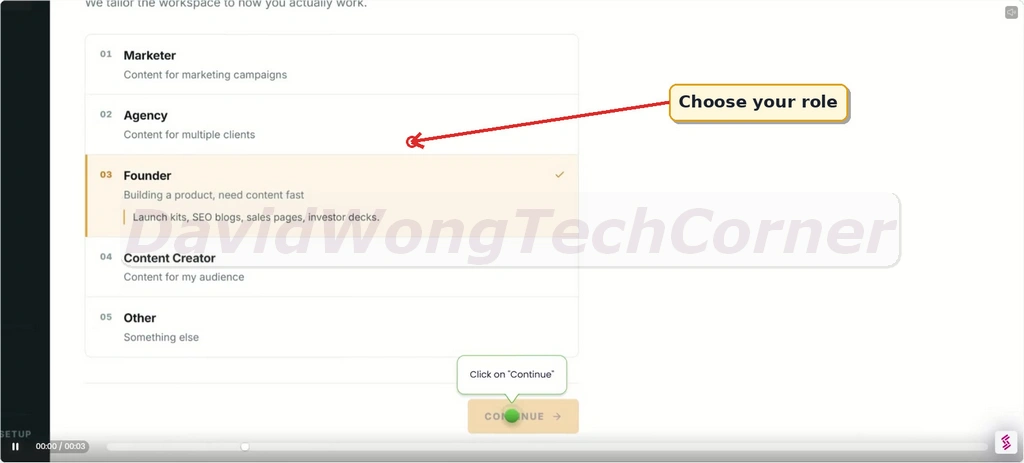
Begin by selecting the role that best reflects how you intend to use Claw AI Army.
For this walkthrough, I chose Founder, which prepares the workspace for tasks involving product development, launches, SEO, blogging, sales pages, investor decks, and related business work.
Next, select the main type of work you want the platform to handle first.
The available choices include Blog Content, Social Media, Email Marketing, Ad Copy, and Everything.
In this example, I picked Ad Copy and moved to the next setup stage.
Then, give your project a clear and recognizable name.
This makes it easier to keep future tasks, workflows, and generated assets under the correct workspace.
[+] Run Your First Workflow
Claw AI Army includes preconfigured workflows that let you begin useful tasks without manually arranging every individual step.
For this demonstration, I opened the Google Ads Campaign Builder, entered Weight Loss as the topic, and clicked Run Pipeline.
The system then works through the connected stages needed to prepare the campaign.
After your workspace is created, the Dashboard gives you an at-a-glance view of projects, remaining credits, AI tools, recent generations, and frequently used actions.
You can use this area as the main launch point for new workflows, content jobs, and agent-powered tasks.
[+] Connect and Command Claw Agents
Select Claw Agents from the left menu to view and manage agents connected with external messaging channels.
Here, you can see supported platforms such as WhatsApp, Telegram, Slack, and Discord, together with the available agent catalog.
Pick the channel you want to use and follow the on-screen steps to establish the connection.
Claw AI Army walks you through the required authorization, bot configuration, commands, or linking codes for that platform.
With WhatsApp, for instance, the platform creates a unique /start linking code for your account.
Copy that code, open your Claw AI Army WhatsApp chat, paste it into the conversation, and send it.
After the connection is completed, go back to the Claw Agents area.
You should now see the channel marked as Linked, meaning you can start assigning jobs to Claw Agents directly through chat.
You can connect Google Drive as well, allowing Claw AI Army to save and arrange generated files inside dedicated folders.
Choose the Google account you want to use and grant the requested permissions to finish the connection.
[+] Send a Job From Chat
Once your messaging channel is connected, simply tell your Claw Agent what you want using normal conversational language.
For jobs that consume generation credits, the agent can show the estimated maximum usage along with your current credit balance before proceeding.
Reply Yes to authorize the job, or choose Cancel when you do not want it to continue.
After approval, the agent carries out the necessary workflow and sends the completed output back into the same chat.
You can immediately follow up with another request while continuing from the existing project context.
Telegram works in much the same way.
During my test, I asked the agent to produce a short luxury wristwatch video, checked the estimated credit usage, and approved the request.
Once processing finished, the completed video appeared right inside the Telegram chat for immediate preview and use.
Chat commands can also handle more substantial deliverables.
For example, I requested a Weight Loss Project landing page, and the agent responded with a link to the completed page that opened directly in my browser.
[+] Explore the Arsenal
Go to Arsenal to explore the collection of specialist AI tools available inside Claw AI Army.
You can browse by category or use the search field to find a specific capability more quickly.
For this walkthrough, I searched for an advertising tool and selected Ad Copies.
[+] Add Your Brief and Generate the Result
Inside the chosen tool, add your project brief, select the output language you prefer, and press Run.
The readiness panel makes the workflow easy to follow: enter the required information, launch the tool, and then check the completed output.
After generation finishes, Claw AI Army presents multiple ad-copy versions in the results section.
You can compare the different angles, choose the strongest option for your campaign, or refine the copy further.
Your generated files may also be saved automatically inside the ClawAI Army Drive folder connected to Google Drive.
Assets are sorted into useful categories including Videos, Pages, Images, Documents, and Audio.
Open the Documents folder and choose the relevant date to see files produced during the individual stages of your workflow.
In this example, separate documents were stored for Target Audience, Google Ad, Call-to-Action, Ad Copies, and other campaign materials.
[+] Manage Everything From My Content
The My Content section serves as your central library for assets produced with Claw AI Army.
Use the tabs at the top to filter your library by Arsenal Results, Playbooks, Campaigns, Landing Pages, Images, Videos, and Voiceovers, making previous work easy to find again.
Inside Landing Pages, you can revisit generated pages and use options to open them, copy their URLs, or download the HTML files.
The Videos tab keeps your generated video assets organized with previews and controls for opening, sharing, or downloading them.
Finally, the Voiceovers area stores generated audio files together with their matching scripts.
From the same library, you can listen to each recording and manage the saved voice output whenever you need it.
For a full walkthrough, please watch my review & demo video below:
Claw AI Army Funnel Breakdown
FRONT END: Claw AI Army ($39)
The Claw AI Army front-end gives you lifetime access to its channel-first AI agent workspace for a one-time payment, with no recurring software fee. You get a large collection of specialized skills, ready-made workflow agents, custom agent creation tools, project memory, approval controls, and commercial-use rights in one package.
What you get inside the front-end offer:
BUNDLE: Claw AI Army Bundle Offer ($347 => $297)
Add my code “BUNDLE50” to get $50 off the Bundle.
The bundle package gives you far more value by combining the front-end system with all the premium upgrades, exclusive bonuses, and lifetime updates. You unlock unlimited agents, pro workflows, DFY assest, automation & agency whitelabel power at a special bundle price.
What’s Included In The Bundle:
🔰 Front-End: Claw AI Army ($39)
🔰 OTO 1: Claw AI Army Unlimited Edition ($67)
🔰 OTO 2: ClawVisuals ($77)
🔰 OTO 3: ClawVoice ($47)
🔰 OTO 4: Claw Skills Vault ($47)
🔰 OTO 5: Agency Whitelabel Edition ($97)
🔰 All rights & access unlocked and all bonuses for front-end and OTOs
Now let’s check the details of each OTO offer:
OTO 1: Claw AI Army Unlimited Edition ($67)
Claw AI Army Unlimited removes the main operating ceilings of the front-end and gives heavier users more room to run agents, projects, workspaces, credits, automations, and team-based workflows.
What you get inside OTO 1:
✅ Unlimited AI Agents; Unlimited Workspaces; Unlimited Team Members
✅ Expanded AI Credits — Process a much higher volume of AI jobs.
✅ Parallel Task Runs — Run multiple jobs simultaneously.
✅ Scheduled & Recurring Tasks — Automate work on predefined schedules.
✅ Agent Teams — Combine multiple agents for more complex workflows.
✅ REST API & Webhooks — Connect Claw AI Army with external apps and systems.
✅ 150+ Premium Workflow Templates — Access more ready-made processes.
✅ Expanded Memory & Project Context — Give agents more room to retain useful project information.
✅ Priority Processing & Support — Get faster job handling and priority assistance.
✅ Lifetime Access — One payment with no recurring software charge for this upgrade.
✅ 30-Day Guarantee — Covered by the published guarantee policy.
>>>Click here to buy Claw AI Army OTO 1<<<
OTO 2: ClawVisuals ($77)
ClawVisuals turns Claw AI Army into a visual-production workforce.
What you get inside OTO 2:
✅ Complete Visual Asset Packs — Produce collections of related creative assets from one brief.
✅ Ad Banners & Marketing Graphics — Generate promotional visuals for campaigns.
✅ Professional Logo Concepts — Develop logo and branding ideas with AI.
✅ Social Media Graphics — Quickly produce visual content for social platforms.
✅ Background Removal — Remove image backgrounds in one click.
✅ Image Upscaling — Improve resolution and overall output quality.
✅ Object Removal & Cleanup — Remove unwanted elements from images.
✅ Photo Colorization — Add color to black-and-white images.
✅ Brand Presets — Save visual preferences for more brand-aligned content.
✅ Multiple Export Formats — Export generated assets in different formats.
✅ Multi-Model Image Generation — Access multiple AI image-generation models.
✅ Chat-Based Generation — Request assets directly from supported chat channels.
✅ Project Organization — Keep related visual assets together under the correct project.
✅ Commercial-Use Rights, Lifetime Access & 30-Day Money-Back Guarantee
>>>Click here to buy Claw AI Army OTO 2<<<
OTO 3: ClawVoice ($47)
ClawVoice adds audio understanding and voice generation to your AI workforce. It lets you send voice-note commands, transcribe recordings, generate voiceovers, create subtitles, and translate or localize content across 70+ languages.
What you get inside OTO 3:
✅ Voice Notes as AI Inputs — Give your Claw Agents instructions using recorded voice.
✅ Audio & Video Transcription — Convert recordings into written content.
✅ Neural AI Voiceovers — Generate natural-sounding spoken audio.
✅ Translation & Localization — Adapt audio content across 70+ languages.
✅ Automatic Subtitles & Timestamps — Generate caption-ready content automatically.
✅ MP3, WAV & SRT Export — Download audio and subtitle files in useful formats.
✅ Multiple Voices, Accents & Tones — Match different content styles and audiences.
✅ Advanced SSML Controls — Fine-tune how generated speech sounds.
✅ Speaker-Labeled Transcripts — Separate different speakers within recordings.
✅ Recording-to-Content Workflows — Turn audio inputs into additional content automatically.
✅ Claw Agent Integration — Connect voice capabilities directly with your existing agents.
✅ Project-Based Voice Outputs — Send generated assets back into the appropriate projects.
✅ Commercial-Use Rights, Lifetime Access & 30-Day Money-Back Guarantee
>>>Click here to buy Claw AI Army OTO 3<<<
OTO 4: Claw Skills Vault ($47)
Claw Skills Vault expands your agent library with ready-made blueprints, industry packs, advanced workflow recipes, and prewritten task commands.
What you get inside OTO 4:
✅ 50+ Job-Ready Claw Agent Blueprints for common business roles.
✅ 25+ Industry & Business Packs — Access configurations created around different markets.
✅ 100+ Advanced Workflow Recipes — Deploy more sophisticated multi-step processes.
✅ 500+ Ready-to-Use Task Commands — Start common jobs with prepared instructions.
✅ Faster Specialist Deployment + Customizable Blueprints — Launch ready-made agents quickly, then adapt them to your brand and business needs.
✅ Complete AI Departments + Reusable Workflows — Deploy groups of specialist agents and reuse proven workflows across clients, projects, and campaigns.
✅ Deployment Checklists + Customization Guides — Follow step-by-step setup guidance and modify each blueprint with less guesswork.
✅ Commercial-Use Implementation License — Use eligible implementations commercially according to the included license terms.
✅ Lifetime Library Access + 30-Day Guarantee — Pay once for ongoing access, backed by the published 30-day money-back policy.
>>>Click here to buy Claw AI Army OTO 4<<<
OTO 5: Agency White Label (Starter: $97 / Growth: $197 / Scale: $397/year)
Agency White Label is the business-focused upgrade for users who want to launch their own branded AI workforce platform. You can apply your own branding and domain, create isolated client workspaces, control plans and credits, manage customers, and set your own retail pricing.
What you get inside OTO 5:
✅ Your Own AI Workforce Platform — Launch the system under your own business identity.
✅ Custom Domain + Automatic TLS/SSL — Operate from your own domain with secure access.
✅ Complete Branding Controls — Customize the logo, colors, and product name.
✅ Isolated Client Workspaces — Give individual customers their own environments.
✅ Custom Agency Plans — Create your own packages and feature entitlements.
✅ Credit Allocation & Usage Ledgers — Assign resources and track client usage.
✅ Client Lifecycle Controls — Invite, suspend, restore, or archive accounts.
✅ Branded Agent Catalog — Decide which agents your customers can access.
✅ Central Agency Console — Manage client provisioning from one location.
✅ Your Own Retail Pricing — Set your prices with no revenue share.
✅ Full White-Label Control — Present the platform under your agency brand.
✅ Agency Analytics Dashboard — Track important platform and customer activity.
✅ Agency API & Webhooks — Connect the platform with other applications and workflows.
✅ Agency Launch Kit — Get additional resources for launching the service.
✅ 30-Day Activation Guarantee — The activation purchase is covered by the stated guarantee.
>>>Click here to buy Claw AI Army OTO 5<<<
Frequently Asked Questions – Things You Need To Know Before Deciding
Is Claw AI Army the same product as Flowomatic?
No. Claw AI Army is a separately positioned product with its own brand, onboarding and channel-first experience. It uses proven underlying workflow and AI infrastructure while Flowomatic remains independently available.
Do I need to write complex prompts?
No. The agents and workflows are designed to collect required inputs through clear questions. Better information can improve results, but you do not need to memorize prompt formulas.
Which messaging channels are supported?
The launch page will list only channels that have passed production testing. The intended channel set includes WhatsApp, Telegram, Discord and the web dashboard, subject to official API and account requirements.
Does this use my personal WhatsApp account?
The WhatsApp integration must follow the official supported business-platform connection process. It should not be marketed as unauthorized automation of personal accounts.
Can the agents take actions outside the platform?
Only supported, permissioned actions and integrations are available. Sensitive external actions may require approval. The core offer focuses on reliable workflow execution rather than unrestricted access to a device or browser.
Can I create my own Claw Agents?
Yes, within the features and limits of your plan. You can define roles, instructions, inputs, knowledge and approved skills.
What are the 259 skills?
They are specialized capabilities across writing, research, marketing, strategy, ecommerce, business and productivity. The final catalog will identify which are channel-ready at launch.
What is a workflow agent?
A workflow agent uses multiple connected steps to create a complete result. For example, it can research an audience, generate angles, write a landing page, create emails and organize the campaign as one job.
Can I use outputs for clients?
Eligible outputs include commercial-use rights under the published license terms. Reselling software access or launching client workspaces requires the relevant Agency/Reseller license.
Is there a monthly fee?
The advertised front-end lifetime plan is a one-time software purchase. Any usage costs, premium credits, third-party charges, agency hosting plans or optional upgrades must be disclosed in the final checkout terms.
Does the front end include unlimited usage?
The Core plan includes the limits shown in the final comparison table. Claw AI Army Unlimited removes or expands the specified limits.
Can my team use it?
Team access depends on the plan. Expanded team seats and agency controls are part of the relevant upgrades.
Is API access included?
API access is assigned according to the final offer structure and is expected to be included in Claw AI Army Unlimited or higher tiers.
Can agencies white-label it?
Yes, through the Agency White Label upgrade once the custom-domain, branding, tenant and billing features are production-ready.
Is it beginner friendly?
The goal is to make the first job easier than building an automation. Users install an agent, connect a channel and follow guided questions.
What if I prefer the dashboard?
The web dashboard remains available for managing agents, projects, task history, settings, files, credits and outputs.
Don’t forget to check out the handy bonuses that comes with Claw AI Army. They pack a variety of tools that tackle different parts of the process, so you can move faster, get stronger results, and cover every gap in your workflow.
>Tap To See The Full Bonus Package And Claim Your Bonuses<
All bonuses are always available and delivered instantly inside your member area:
If you have any issues accessing them, please email davidwongbonus@gmail.com for fast support, and I will manually send everything to you.
