Clientforce AI Review
My Full Look at This AI Sales Agent Platform for Leads, Outreach, Follow-Ups, and Closings

Generating leads and turning them into paying customers sounds simple on paper, but in reality, it can become one of the most time-consuming parts of running a business. You have to find the right prospects, send the right message, follow up at the right time, handle replies, and keep every conversation moving. For many business owners, marketers, and agencies, that daily process can feel repetitive, messy, and hard to scale.
The problem gets even bigger when everything depends on manual effort. Leads slip through the cracks. Follow-ups get delayed. Promising conversations go cold. And when outreach is spread across different tools, channels, and inboxes, keeping the whole sales process organized becomes even more frustrating. A lot of time gets spent managing activity instead of actually growing revenue.
That is why tools like ClientForce AI are getting attention. It promises to help automate key parts of the sales process with AI Sales Agents that can handle prospecting, outreach, follow-up, and more from one platform.
In this ClientForce AI review, I’ll walk you through what it does, how it works, what you get, and whether it is worth your attention, so keep reading to discover the full details.
What Is Clientforce AI?
ClientForce AI is an AI sales agent platform that helps businesses run complete sales campaigns from lead generation to follow-up, meeting booking, and proposal delivery. It is made for companies that want more sales activity happening every day without handling every step manually.
With ClientForce AI, you can launch automated campaigns that find leads, reach out across multiple channels, make AI voice calls, send tailored proposals, and manage conversations from one inbox. The goal is clear: keep your pipeline active, get more qualified calls booked, and create more opportunities to close revenue.
What ClientForce AI Can Do:
▶ Find and add leads to active campaigns
▶ Run multichannel outreach automatically
▶ Make AI-powered voice calls for follow-up
▶ Send dynamic proposals based on each prospect
▶ Book meetings directly into your sales process
▶ Manage replies and conversations in one unified inbox
Who ClientForce AI Is Best For:
- Agencies
- Local businesses
- SaaS and B2B companies
- Consultants
- Service providers
For anyone serious about generating more leads and turning outreach into booked calls and sales, ClientForce AI gives you a faster, more scalable way to keep the process moving.
Clientforce AI Features At A Glance
Let’s take a closer look at the software’s key features:
✅ Create Your Own AI Sales Agents
ClientForce AI lets you create fully autonomous AI sales agents that can handle your pipeline from prospecting to follow-up and closing. Each agent can be trained with your business details, your offer, and your communication style, then put to work around the clock to qualify leads, send tailored messages, respond to objections, route conversations, and book meetings automatically.
It gives you the feel of having a full SDR and AE team running in the background without extra payroll, burnout, or uneven performance.
Included in this feature:
- Agent Creation Wizard
- AI-Driven Messaging
- Smart Routing & Logic
- Agent Knowledge Engine
✅ Run Perpetual Campaigns
ClientForce AI helps you launch campaigns that keep running without constant manual attention. Your agents can continue pulling in fresh leads, nurturing prospects, sending proposals, following up, and pushing deals forward without needing to be restarted over and over again.
Once your setup is in place, the system keeps your sales machine active 24/7.
Included in this feature:
- Always-On Pipeline
- Behavior-Based Follow-Up
- Hands-Free Closing
✅ Multichannel Outreach
ClientForce AI gives you the power to reach prospects through the channels they are most likely to respond to. Your agents can communicate through email, proposals, voice, SMS, WhatsApp, and LinkedIn, all from one connected system.
Everything works together as one outreach engine, so you are not stuck juggling separate tools or switching between platforms.
Included in this feature:
- Email + Proposal Automation
- WhatsApp & SMS Nudges
- AI Voice Calls
- LinkedIn Smart Capture
✅ Auto-Prospect On Demand
ClientForce AI can generate new sales opportunities whenever you need them. Just enter your keywords or preferred filters, and your agent can pull fresh leads, validate them, and place them directly into your active campaigns.
There is no need to depend on spreadsheets, manual scraping, or slow prospecting work.
Included in this feature:
- Keyword-Based Quick Prospecting
- Instant Validation
- One-Click Add to Agent
✅ Never Run Out of Leads
ClientForce AI gives you multiple lead generation tools working together so your pipeline stays fresh.
The system can find and feed new opportunities into your campaigns automatically, helping you wake up to new potential deals without spending hours hunting for leads yourself.
Included in this feature:
- Finder v2 — Automated Lead Discovery
- Chrome Capture One-Click Prospecting
- Embeddable Lead Capture Widget
- Smart CSV Import & Validation
✅ Engage Every Lead Like You Wrote Each Message Yourself
ClientForce AI helps your outreach feel personal and relevant, not like another bulk campaign.
Prospects can receive dynamic proposals, tailored sequences, and voice scripts that feel crafted for them, which gives your campaigns a stronger chance of getting replies and starting real conversations.
Included in this feature:
- Dynamic Proposals
- Multi-Channel Sequences
- Voice Scripts with Objection Handling
✅ Let AI Do the Follow-Ups
ClientForce AI can handle follow-up for you so leads do not go cold while you are busy with other work.
The platform can generate a playbook on the fly or let you choose a done-for-you playbook during setup, then your agent can continue sending follow-ups, nudges, reminders, and objection responses until the prospect takes action.
Included in this feature:
- Create Niche-Specific AI Sales Agents
- DFY Playbooks Library
- WhatsApp & SMS Automation
- Human-Like Consistency
✅ Lead Management That Keeps Every Deal Moving
ClientForce AI tracks lead behavior and campaign progress automatically, helping you keep every deal moving forward. You can see detailed activity timelines such as opens, clicks, replies, and calls, understand which leads are hot or still warming up, and let the AI choose the next best follow-up step.
The hottest opportunities rise to the top, so your attention goes where it can produce the most revenue.
Included in this feature:
- Exact activity timelines for opens, clicks, replies, and calls
- Lead status visibility for hot, warming, or not-ready prospects
- AI-selected next best follow-up
- Priority focus on top leads
✅ Go Beyond Email — Close Sales With Voice
ClientForce AI goes further than inbox outreach by adding voice-driven selling into the process. Your agent can make calls in real time, qualify prospects, respond to common objections, and even send booking links or payment links during the conversation.
It brings together the power of cold outreach and phone-based follow-up in one system.
Included in this feature:
- Automated AI Calls
- Human Calls
- Automated Call Capture Widget
✅ Your Website Becomes a Sales Rep
ClientForce AI can turn your website into a live sales touchpoint that helps capture and convert visitors.
People landing on your site can chat with your agent, leave their details, or request a callback, while the AI takes care of the follow-up behind the scenes. That means more chances to turn passive traffic into booked calls and paying clients.
Included in this feature:
- Embeddable Lead Capture Widget
- AI Chat
- Callback Form
✅ Stay Safe and Deliverable
ClientForce AI includes deliverability and reputation tools that help protect your outreach performance.
It checks email sending health, supports domain warm-up, monitors voice number reputation, and helps keep campaigns compliant. The result is a safer sending environment with a better chance of getting messages through.
Included in this feature:
- Multiple Sender Accounts & Rotation
- Real-Time Email Verification
- Automated Warm-Up & Throttling
- Compliance Guardrails
- Health Dashboards & Alerts
✅ Know Exactly What’s Working and What’s Not
ClientForce AI gives you analytics and attribution tracking so you can see what is driving results.
You can monitor campaign performance, agent output, message performance, call metrics, and source attribution, then make smarter decisions based on real numbers instead of guesswork.
Included in this feature:
- Full-Funnel Visibility
- Agent Performance Dashboards
- Voice & Call Metrics
- Source Attribution
- Team & Sequence Analytics
- Export & Integration Ready
✅ Always-On, Always Closing
ClientForce AI keeps your sales flow moving from prospecting to outreach, follow-up, calls, and closing inside one connected process. Sales activity can continue in the background while you are working on other things or away from your desk.
One simple setup can keep the whole engine running.
Included in this feature:
- Continuous end-to-end campaigns
- Prospecting to close in one flow
- End to end in 1 simple setup
✅ One Central Inbox for All Campaigns
ClientForce AI brings replies, calls, WhatsApp messages, and agent activity into one unified inbox.
You can track every campaign in real time, jump into conversations when needed, and stay fully in control without chasing scattered updates across multiple apps and accounts.
Included in this feature:
- Unified Multi-Channel Inbox
- AI-Powered Reply Labeling
- Smart Escalations
- Live Call Console
- Warm Transfers With Context
✅ Connect Everything. Automate Anything.
ClientForce AI connects with the tools that already power your business, helping your entire workflow stay in sync.
It can integrate with CRMs, email systems, calendars, voice tools, payment systems, and automation platforms so your agents can trigger actions, log activity, send follow-ups, and keep the process moving without workflow gaps.
Included in this feature:
- Calendar Sync
- Telephony & Voice Providers
- WhatsApp Business API
- CRM & Zapier/Webhook Connections
- Payment Integrations
- Enrichment & Verification Providers
Clientforce AI Step-By-Step Software Walkthrough
Getting started with ClientForce AI is quick and easy. Just log into your account, and you can access the entire platform almost instantly:
Once inside, you arrive at the main dashboard where everything is laid out clearly in one place. From here, you can view important numbers like leads, bookings, and recent activity, while also jumping into agents, contacts, and campaigns from the top navigation. It works as the main command center for running and tracking your sales operation:
Now let’s begin by creating a new Agent:
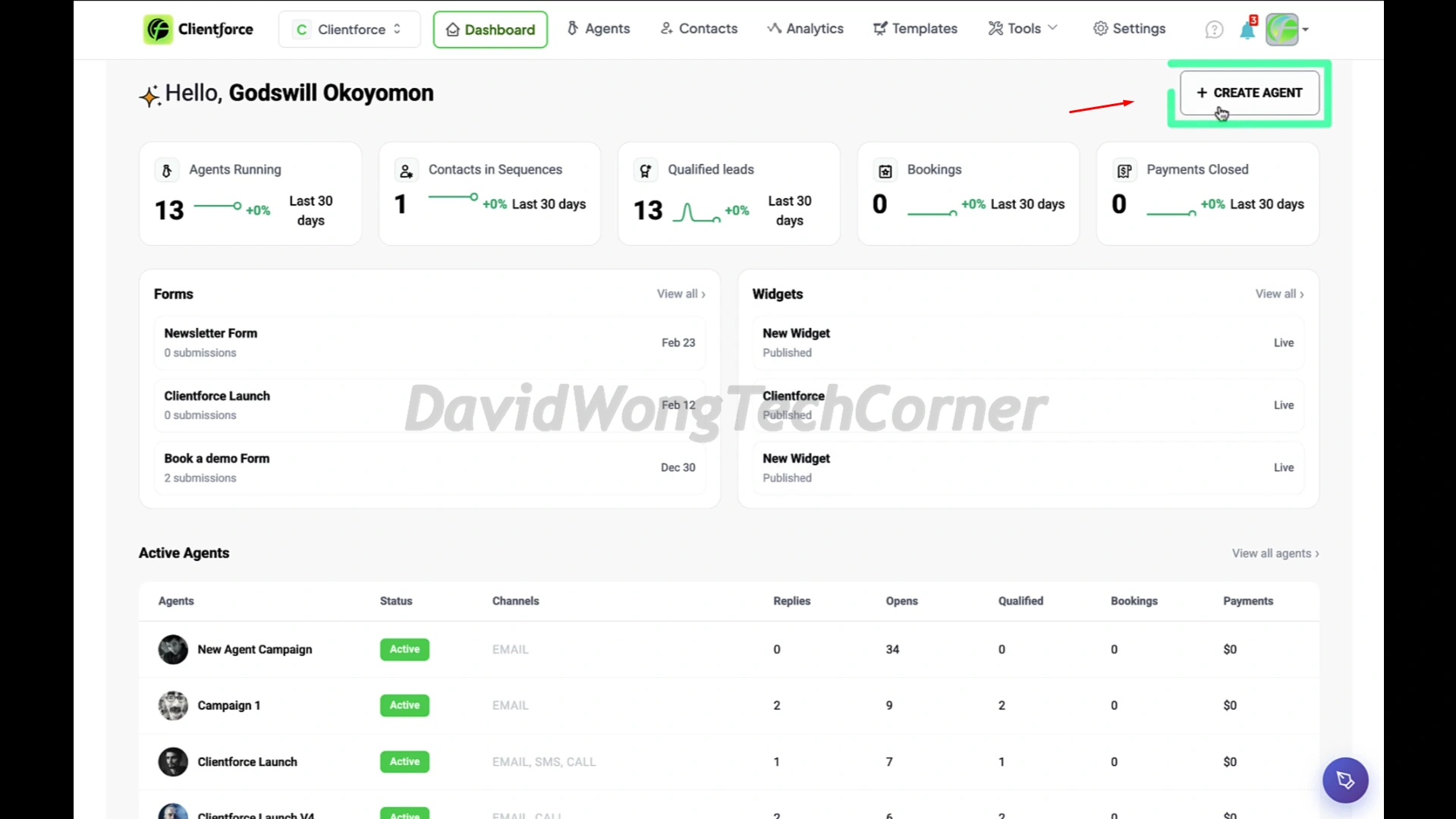
From there, you’ll move into the agent setup area, where you decide how your AI agent will work. You can enter the agent name, assign its role, choose the communication style, and pick a voice persona that fits your campaign. This is the stage where you shape how the agent speaks, responds, and supports your sales workflow:
After clicking “Next”, the platform takes you to the training step, where you feed your agent the core details about your business. You can explain your offer, choose your industry, and connect outside sources such as Google Drive or Notion. This gives the AI more context so it can communicate in a way that matches your business more accurately:
You can also upload files directly or paste in your website URL:
Next, under the “Starting Point” section, you can choose from three setup options: “From Scratch”, “Start Building with AI”, or “From Playbook”.
For this demo, we’ll go with the “Start Building with AI” option. All you need to do here is answer a few simple questions, and the AI will generate a complete campaign structure for you like this:
After a short wait, the AI finishes creating a full campaign plan that includes follow-up and nurturing sequences ready to use:
Inside each part of the campaign, you can review, edit, and refine everything however you want. You can see the full content clearly, including the messaging, tone, voice profile, retry settings, and more:
For users who already have leads prepared in advance, those leads can be added easily using one of the three available import methods:
For users starting without a lead list, this is where one of ClientForceAI’s most impressive features comes in: “Enable Lead Capture”. You only need to enter a few basic details such as duration, keyword, location, and country, then the AI agent will automatically discover and save leads for you without manual searching:
The final step is “Guardrails & Account”, which is the last stage before launching your AI agent. Here, you can set the sending schedule for emails and calls, while features like Randomization and Rotation help control how many emails and calls go out per day:
Once that is done, your AI agent is live. Now let’s look at some of the features in action. First, inside the “Inbox”, you can easily switch between channels like email, SMS, and WhatsApp. You can also apply filters to view messages by category and keep conversations organized:
Another powerful section available to your AI agent is “Template”. Here, you get access to ready-made templates for many campaign types, including outreach, follow-ups, and promotions. These templates help you move faster by giving you proven message structures that you can quickly adjust for your own campaigns:
Another valuable part of the platform is that the agent does not operate on its own in a closed system. It can connect with third-party tools you already use, including platforms like JVZoo and others:
In the proposal section, you can manage and organize all your proposals from one place. You can create new proposals, update existing templates, and let the AI send personalized proposals at scale through email, SMS, or WhatsApp:
Then there is the analytics section, where you can monitor the performance of your campaigns in real time. You can track important metrics such as replies, bookings, and payments, while visual charts make it easier to spot trends and improve your results:
For a full walkthrough, please watch my review & demo video below:
Clientforce AI Funnel Breakdown
FRONT END: Clientforce AI ($47)
Add code “‘SOC2’” to get $2 Off
The Clientforce AI front-end offer gives you access to the core system you need to launch your first AI sales agents and start automating your sales workflow from beginning to end. It covers the essential tools for prospecting, follow-ups, appointment booking, and deal movement, making it a solid starting point for businesses that want to put AI into their sales process without jumping into the higher upgrades right away.
What you get inside the front-end offer:
BUNDLE: Clientforce AI Bundle Offer ($497)
Add code “‘FORCE100’” to get $100 Off
This is the best option for buyers who want the full Clientforce AI system, all upgrades, and the strongest overall value without having to piece everything together separately.
The bundle includes:
🔰 Front-End: Clientforce AI Premium (currently priced at $47)
🔰 OTO #1: Clientforce AI Pro (currently priced at $67)
🔰 OTO #2: Clientforce AI Unlimited (currently priced at $297)
🔰 OTO #3: Clientforce AI Agency (currently priced at $97)
🔰 OTO #4: Clientforce AI Reseller (currently priced at $497)
>>>Click here to buy Clientforce AI Bundle<<<
OTO 1: ClientForce AI PRO ($67)
Unlock additional AI Playbooks, multi-agent workflows, and advanced sequencing automation. Go beyond basic campaigns—run smarter funnels, personalize at scale, and equip your agents to perform
What you get inside OTO 1:
✅ 5 AI Agent slots with the ability to run 3 agents at the same time for parallel campaigns, multiple offers, and different audience segments
✅ 2,000 Contacts, 10 Custom Fields, and a Unified Inbox to manage lead data, conversations, and campaign activity more efficiently
✅ 5 Campaigns & Workflows for running more advanced end-to-end sales campaigns across prospecting, follow-up, nurturing, and closing
✅ White-Label Outbound Campaigns with ClientForce branding removed across your customer-facing outreach
✅ Multi-Channel Outreach across Email, SMS, Call, and WhatsApp, with autonomous replies and broader communication coverage
✅ WhatsApp Messaging and WhatsApp Flows + Auto Follow-Ups on the roadmap for deeper messaging automation
✅ 50 Email Templates, 5 Campaign Playbooks, and stronger follow-up systems for prospecting, nurturing, and closing
✅ 5 Dynamic 1:1 Business Proposals and professional proposal templates for more polished, personalized offers
✅ Real-Time Conversion Feedback for tracking opens, replies, intent signals, and buyer interest as campaigns run
✅ Lead Enrichment and Prospecting Tools, including ClientForce Lead Finder, GMB Search and Email Finder, and buyer detail discovery tools
✅ LinkedIn Chrome Extension for faster lead capture, enrichment, and outreach directly from LinkedIn
✅ 3 Forms, 3 Chat Widgets, and 5 DFY Websites and Landing Pages to support lead capture and campaign deployment
✅ 5 Calendar Integrations plus Meetings and Bookings tools for smoother scheduling and appointment setting
✅ Inbox Assistant to help manage replies and ongoing sales conversations
✅ Integrations & Connections, including Stripe Integration, for smoother automation across your sales stack
✅ Multi-Language Campaign Creation for reaching prospects across major global markets
✅ Premium Support for faster help when setting up and scaling your campaigns
>>>Click here to buy Clientforce AI OTO 1<<<
OTO 2: ClientForce AI Unlimited ($297 per year)
The Unlimited upgrade removes the caps and opens the door to full-scale usage across leads, contacts, agents, campaigns, workflows, templates, and automations. This is the upgrade for users who want to scale hard, run more moving parts at once, and avoid hitting platform limits while growing their sales operation.
What you get inside OTO 2:
✅ Unlimited Lead & Contact Capacity, Lists and Tags, Custom Fields, and Global Search
✅ Unlimited AI Agents, Campaigns & Workflows, and Workspaces
✅ Unlimited Lead Searches by keyword, role, location, and niche
✅ ClientForce Lead Finder Daily Search, Unlimited GMB Search and Email Finder, and Unlimited LinkedIn Chrome Extension
✅ Unlimited Forms, Chat Widgets, and DFY Websites and Landing Pages
✅ Unlimited Email Templates, Campaign Playbooks, and Dynamic Business Proposals
✅ Unlimited Multi-Channel Campaigns across Email, SMS, WhatsApp, and Call
✅ Unlimited Automations for prospecting, follow-up, nurturing, and conversions
✅ Unlimited Inbox Replies with Inbox Assistant
✅ Unlimited Integrations & Connections, Calendar Integrations, Appointments and Meetings
✅ Unlimited Custom Sources for more business and campaign data
✅ Premium AI Voices, Stripe Integration, and Multilingual Support
✅ ClientForce Branding Removal for a more white-label experience
✅ Unlimited Revenue Potential with more agents, campaigns, and outreach running in parallel
>>>Click here to buy Clientforce AI OTO 2<<<
OTO 3: ClientForce AI Agency ($97)
The Agency upgrade turns ClientForce AI into a client service business model. It gives you the tools, rights, assets, and training to run campaigns for clients, manage multiple brands, and sell AI-powered outreach and automation services under your own business name.
What you get inside OTO 3:
✅ Multiple Workspaces and Brand Management from one master dashboard
✅ Client-Branded Dashboards and full white-label delivery so clients see your brand, not ClientForce
✅ Team Invite access for staff and team collaboration
✅ Client Isolation & Data Security to keep each workspace separate and protected
✅ Full Agency License with rights to sell ClientForce-powered services and keep 100% of the revenue
✅ Access to All Campaign and Niche Playbooks for faster client delivery across different markets
✅ Advanced Workflow Playbooks and Templates for onboarding, retention, upsells, activation, and churn reduction
✅ Done-for-You Digital Services for prospecting, booking, reactivation, WhatsApp flows, LinkedIn outreach, and cross-channel nurturing
✅ Done-for-You Outreach Assets such as landing pages, funnels, ads, scripts, offer frameworks, and a DFY Agency Website
✅ Done-for-You Presentation Decks and Proposal Kits for pitching and closing clients
✅ Mentorship and Agency Growth Training for client getting, pricing, onboarding, and scaling
✅ ClientForce Agency Certification to boost authority and credibility
✅ Priority Agency Support for faster help with setup, onboarding, billing, and workflow issues
>>>Click here to buy Clientforce AI OTO 3<<<
OTO 4: ClientForce AI Reseller ($497)
Sell Clientforce under your own brand and manage client workspaces from a single dashboard. Create accounts, control permissions, and offer a fully white-label sales automation platform while keeping
What you get inside OTO 4:
✅ Reseller License with 50 Front-End Seats to run your own ClientForce-based software business
✅ Rights to manage and resell up to 50 full ClientForce accounts while keeping 100% of each sale
✅ Reseller Control Dashboard to manage all customer accounts from one place
✅ Manual and Automated Account Provisioning for faster and easier onboarding
✅ Conversion-Ready Sales Pages to launch your reseller offer faster
✅ High-Impact VSLs and Sales Videos to promote your offer with ready-made sales assets
✅ Full Media Buying Toolkit to support your traffic and promotion efforts
✅ Dedicated Support and Regular Updates for ongoing help and platform improvements
>>>Click here to buy Clientforce AI OTO 4<<<
FAQs – Things You Need To Know Before Deciding
What exactly is ClientForce?
ClientForce is an AI Sales Agents platform. You set up an agent once for a specific goal, and it can find leads, run outreach, handle follow-up, and even generate proposals, with compliance, deliverability, and analytics included from start to finish.
Is this just another CRM or outreach tool?
No. ClientForce works more like a full AI sales agent, not just a place to store contacts or send basic sequences.
Do I need technical skills to use ClientForce?
Nope. ClientForce is made for non-technical founders, marketers, agencies, and sales teams, with a guided setup that makes it much easier to get started.
Can I use this for my clients?
Yes. Many agencies and consultants can use ClientForce to offer lead generation, outreach, follow-up, and automation as a service.
Will my messages be compliant with regulations?
ClientForce is developed with compliance and deliverability best practices in mind, and the platform continues to improve over time in these areas.
Does it work with my existing tools?
Yes. You can connect ClientForce with your current CRM, email tools, calendars, and calling systems through built-in integrations or simple workflows.
Is there training included?
Yes, you’ll get onboarding resources, templates, and examples to help you get live faster.
What if I don’t see results?
You’ll have access to best-practice setups and support so you can improve your campaigns, fine-tune your messaging, and build a more reliable pipeline over time.
How is ClientForce priced after launch?
Pricing is based on the number of agents and platform usage, with clear plans that let you scale as your results grow.
What does “Lifetime” access include?
When you buy this deal, you get long-term access to the features included in your selected plan for a one-time payment. Your access stays active for as long as the product is maintained and supported by the team. There are no recurring fees, and you also receive the updates included in your plan during the product’s active lifecycle.
Can ClientForce really handle the full sales flow?
Yes. ClientForce is made to cover the full process, from lead discovery and outreach to follow-up, proposal delivery, and booking calls, so you are not stuck piecing everything together with separate tools.
Can I run multiple campaigns for different offers or audiences?
Yes. Depending on your plan, ClientForce gives you the flexibility to run different campaigns for different products, niches, or audience segments, which is great for scaling outreach in a more organized way.
Does ClientForce support multichannel outreach?
Yes. ClientForce can support outreach across multiple channels such as email, SMS, calls, and more, helping you reach leads in the places where they are more likely to respond.
Can ClientForce help me save time every day?
Absolutely. One of the biggest advantages of ClientForce is that it takes over repetitive sales actions like prospecting, follow-up, message sending, and lead handling, which can save a huge amount of daily manual work.
Is ClientForce a good fit for beginners and growing businesses?
Yes. ClientForce can work well for beginners who want a guided setup, and it also has room for growing businesses that want more automation, more campaigns, and a more active sales pipeline without needing a large team.
Don’t forget to check out the handy bonuses that comes with Clientforce AI. They pack a variety of tools that tackle different parts of the process, so you can move faster, get stronger results, and cover every gap in your workflow.
>Tap To See The Full Bonus Package And Claim Your Bonuses<
All bonuses are always available and delivered instantly inside your member area. If you have any issues accessing them, please email davidwongbonus@gmail.com for fast support, and I will manually send everything to you.
