Martsi Review
Build, Manage & Monetize Your Own Marketplace With AI

What Is Martsi?
Martsi is an AI-powered marketplace builder that lets you launch and manage your own multi-vendor marketplace without coding or complicated technical setup.
With Martsi, you can create three different types of marketplaces from one platform:
▶ Product Marketplaces: Sell physical and digital products, similar to Etsy or Gumroad.
▶ Service Marketplaces: Connect service providers with customers, like Fiverr or TaskRabbit.
▶ Rental Marketplaces: Create platforms for property, vehicle, or equipment rentals, similar to Airbnb or Turo.
You can customize your storefront, manage sellers and buyers, set commission rates, and earn revenue from transactions.
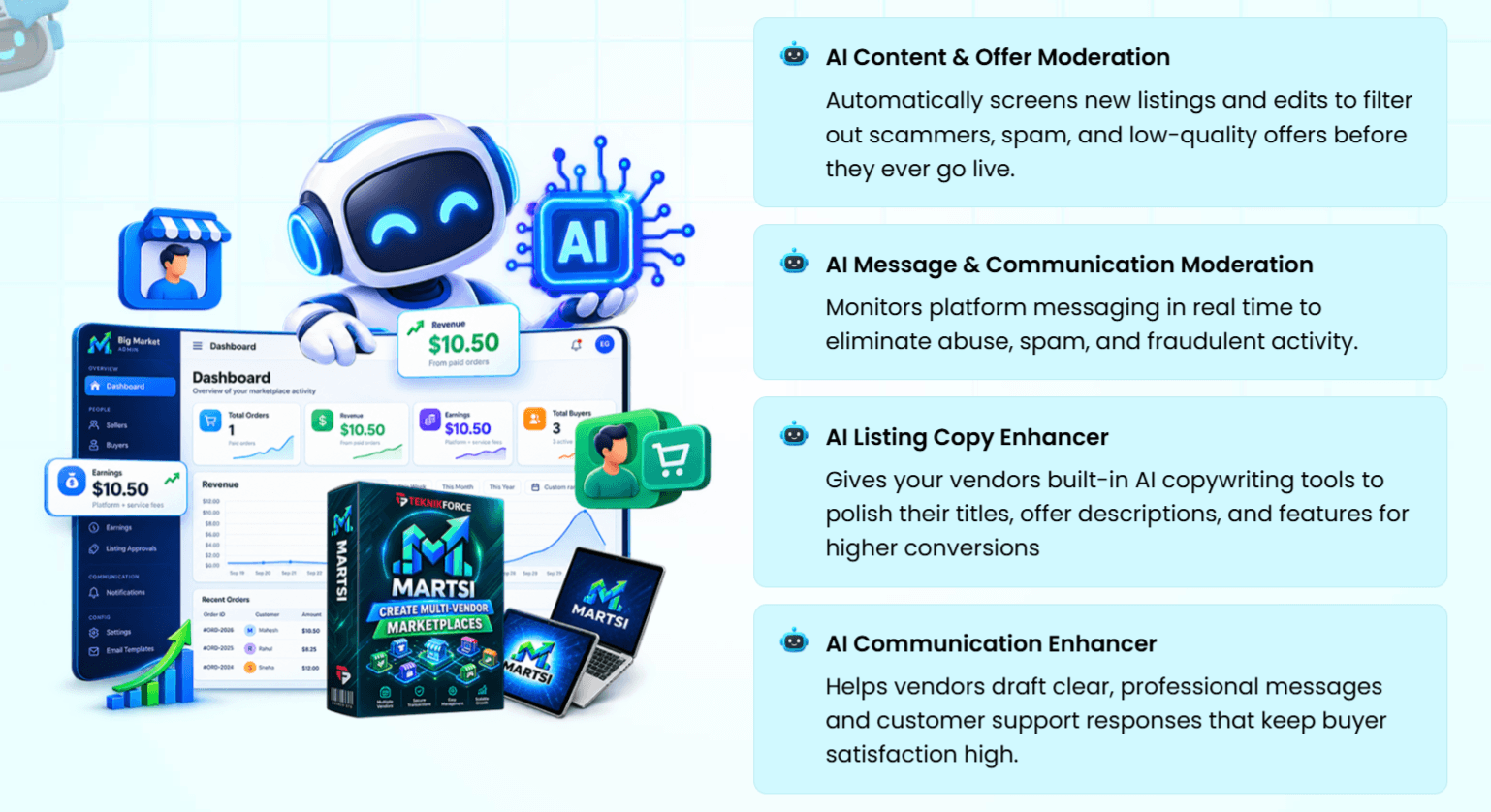
Better yet, Martsi includes AI-powered automation to help manage daily activities, attract traffic, and grow your marketplace with less manual work:
Getting your marketplace up and running takes just three simple steps:
Step 1: Choose Your Marketplace Model
Enter your business details and select the type of marketplace you want to create: products, services, or rentals.
Step 2: Customize Your Marketplace
Personalize your storefront, configure commission rates, and prepare your marketplace for sellers and customers.
Step 3: Activate AI Automation
Turn on Martsi’s AI tools to help manage marketplace activities, support traffic generation, and grow your business.
That’s it! Martsi gives you the tools to launch your own marketplace business, connect buyers with sellers, and generate revenue through commissions and other monetization options.
Martsi Features At A Glance
Martsi comes packed with powerful marketplace management tools, AI automation, and flexible customization options to help you launch, operate, and grow your own multi-vendor marketplace.
Here’s a closer look at its key features:
✅ Create Multiple Types Of Marketplaces
Martsi supports marketplaces for physical products, digital downloads, online services, and rentals. You can create an Etsy-style product marketplace, a Fiverr-style service platform, or an Airbnb-style rental business, all from one system. You can also target specific niches, local communities, or customers worldwide.
✅ AI Content & Listing Moderation
Keep your marketplace professional and trustworthy with automated AI screening. Martsi checks new listings and updates to identify spam, suspicious offers, inappropriate content, and potential scams before they reach your customers.
✅ AI Communication Moderation
Protect your marketplace community with AI-powered message monitoring. The system helps detect abusive language, spam, and suspicious conversations between sellers and buyers, reducing the time you spend manually reviewing messages.
✅ AI Contact Information Filter
Protect your commission revenue by detecting attempts to share contact details through marketplace conversations. This encourages buyers and sellers to complete transactions through your platform, where you can earn commissions.
✅ AI Listing Copy Enhancer
Give your vendors access to AI writing assistance that improves product titles, descriptions, and offer details. Better-written listings can attract more attention, communicate value clearly, and potentially increase conversions.
✅ AI Communication Enhancer
Help vendors communicate more professionally with customers. Martsi’s AI helps draft messages, answer questions, and prepare customer support responses to improve the buying experience.
✅ AI-Powered Marketplace Assistant
Manage important marketplace activities directly through an AI interface, including integrations with Claude or ChatGPT. You can review vendor applications, analyze orders, examine customer feedback, and work through disputes with AI assistance.
✅ Easy Vendor Management & Onboarding
Bring new sellers onto your marketplace through a straightforward onboarding process. From your admin dashboard, you can review vendor applications, manage seller accounts, and oversee their activities without complex workflows.
✅ Order Management & Review
Track transactions across your marketplace. Monitor buyer orders, review sales activity, and see which products or services drive business for your vendors.
✅ Flexible Commission Management
Control how your marketplace generates revenue by setting commission rates on orders. This gives you the flexibility to develop a profitable business model while allowing independent vendors to sell through your platform.
✅ Vendor Payout Tracking
Stay organized when managing payments owed to sellers. Martsi provides payout tracking tools so you can monitor vendor earnings and keep your marketplace’s financial activities under control.
✅ Centralized Dispute Management
Handle disagreements between buyers and sellers from one dashboard. Review dispute details, use AI to analyze the situation, and take appropriate action to resolve issues more efficiently.
✅ Seller & Buyer Communication Inbox
Manage conversations with vendors and customers through a unified messaging system. This helps you respond to questions, provide support, and stay connected with marketplace members.
✅ Reviews & Feedback Management
Build buyer confidence with vendor reviews and customer feedback. Martsi also lets you monitor comments, analyze feedback with AI, and moderate reviews to maintain a reliable marketplace environment.
✅ Custom Themes & AI Homepage Builder
Give your marketplace a professional appearance with customizable themes and homepage options. Adjust your storefront to match your niche, create a branded shopping experience, and use AI assistance to personalize your homepage.
✅ Email Marketing & Broadcasts
Promote your marketplace directly from the platform. Send announcements, notifications, promotional offers, and marketing messages to encourage repeat visits and generate more sales opportunities.
✅ Deep Analytics & AI Insights
Understand how your marketplace is performing with built-in reporting and analytics. Review order data, identify top-performing vendors, generate charts, and use AI insights to uncover growth opportunities.
✅ Advertising & Analytics Tracking
Add tracking pixels to your marketplace to measure advertising performance and visitor activity. This makes it easier to evaluate marketing campaigns and understand which promotional channels are bringing customers to your business.
✅ Team Access & Permissions
Invite team members to help manage your marketplace while controlling what they can access. You can delegate administrative responsibilities while maintaining oversight of key business operations.
✅ Done-For-You Hosting & Custom Domains
Martsi includes hosting, so you don’t need to purchase separate web hosting or handle server maintenance. You can also connect your own custom domain to build a more recognizable, professional marketplace brand.
✅ Powerful Admin Dashboard
Control your marketplace from a centralized administration area. Manage vendors, listings, orders, commissions, communications, reviews, and other essential business activities through an intuitive point-and-click interface.
Martsi Step-By-Step Software Walkthrough
For a full walkthrough, please watch my review & demo video below:
Martsi Funnel Breakdown
FRONT END: Martsi Elite ($32)
The Martsi Front-End gives you everything you need to launch and manage your first AI-powered marketplace without coding or monthly subscription fees. You can create a marketplace for products, services, or rentals, onboard vendors, attract buyers, and earn commissions from transactions.
What you get inside the front-end offer:
✅ 20,000 Welcome Credits to get started.
✅ 1 Marketplace to launch your own multi-vendor platform.
✅ Up to 200 Sellers to list and sell through your marketplace.
✅ Up to 4,000 Buyers to grow your customer base.
✅ Up to 600 Products to showcase offers and listings.
✅ AI Features to assist with marketplace management and automation.
✅ Self-Business Use License to operate your own marketplace.
✅ One-Person License for individual account access.
✅ One-Time Payment with no recurring subscription fees.
✅ 1 Year of Free Upgrades to receive product improvements and updates.
>>>Click here to buy Martsi front-end<<<
BUNDLE: Martsi All-Inclusive Bundle Offer ($367 => $317)
Apply Code “MARTSI50” for $50 Off
The Martsi Bundle gives you the front-end version plus all upgrades at a heavily reduced combined price instead of paying for each offer individually.
The bundle includes:
🔰 Front-End: Martsi Elite (currently priced at $32)
🔰 OTO 1: Martsi Pro (currently priced at $67)
🔰 OTO 2: Martsi Reseller (currently priced at $197)
🔰 OTO 3: Cohorita Pro (currently priced at $67)
🔰 OTO 4: Cloudfunnels Pro (currently priced at $67)
🔰 50,000 Welcome Credits & 5 Marketplaces
🔰 Unlimited Sellers, Unlimited Buyers, Unlimited Products, All AI Features Unlocked with Team Access, and All Revenue Streams Unlocked
🔰 Reseller License (20 Licenses to Sell) & Commercial use license included
🔰 One-Time Payment (Limited Offer) with 2 Years Free Upgrade
🔰 Every exclusive bonus from every individual upgrade
>>>Click here to buy Martsi Bundle<<<
Now let’s check the details of each OTO offer:
OTO 1: Martsi Pro ($67 | One time payment)
Martsi Pro unlocks higher marketplace limits, advanced AI tools, more customization options, and additional ways to generate revenue.
What you get inside OTO 1:
✅ 50,000 Welcome Credits
✅ Create Up To 5 Marketplaces
✅ Unlimited Product & Service Listings
✅ Unlimited Sellers & Buyers
✅ Multi-AI Access
✅ Custom Theme Options
✅ Additional Revenue-Generating Themes
✅ Premium Listings & Paid Membership Opportunities
✅ Team Access
✅ Commercial Licenses For Client Projects
✅ One-Time Payment (Limited Offer)
✅ 2 Years Of Free Upgrades
>>>Click here to buy Martsi OTO 1<<<
OTO 2: Martsi Reseller ($197 | One time payment)
Martsi Reseller lets you sell Martsi Pro under your own marketing campaigns and earn revenue from software sales without handling technical support.
What you get inside OTO 2:
✅ 20 Martsi Pro Reseller Licenses
✅ Use your own sales pages and payment setup
✅ Charge One-Time Or Recurring Fees
✅ Easy Customer Access & License Management
✅ Full Software Access For Your Customers
✅ Keep the revenue generated from your sales
✅ Product maintenance, updates, fulfillment, and customer support handled for you
>>>Click here to buy Martsi OTO 2<<<
OTO 3: Cohortia Pro ($67 | One-time payment)
Cohortia Pro is an AI-powered community builder that helps you launch, manage, and monetize engaging online communities with automated content creation and member interactions.
What you get inside OTO 3:
✅ Cohortia Pro Upgrade
✅ 50,000 Welcome Credits
✅ Create Up To 15 Communities
✅ Unlimited Members Per Community
✅ Advanced AI Content Generation Based On Fresh News
✅ AI-Powered Member Engagement
✅ Access To Multiple Content AI Models
✅ Access To Multiple Graphics AI Models
✅ 15 AI Virtual Team Members
✅ Unlimited Human Admin Team Members
✅ Built-In AI Graphics Creator
✅ AI-Powered Community Moderation
✅ Monetization Through Paid Memberships, Exclusive Content & Events
✅ Commercial Licenses
✅ 2 Years Of Free Upgrades
>>>Click here to buy Martsi OTO 3<<<
OTO 4: Cloudfunnels Pro ($67 | One-time payment)
CloudFunnels Pro is an all-in-one AI-powered funnel builder for creating sales pages, online stores, and membership websites to promote products and generate sales.
What you get inside OTO 4:
✅ Install CloudFunnels On Unlimited Websites
✅ Create Unlimited Online Stores
✅ Free Access To All Templates
✅ Custom Branding Options
✅ Multi-User Login Access
✅ Drag-And-Drop Funnel & Landing Page Builder
✅ Built-In Email Autoresponder
✅ Membership Website Support
✅ Built-In Analytics & Reporting
✅ Payment Gateway Integrations
✅ Commercial Use License
>>>Click here to buy Martsi OTO 4<<<
There are additional offers in case you want more credits and resources:
50k Credits Boost ($44)
>>>Click here to get 50k Credits Boost<<<
Unlimited Daily Transactions ($29)
>>>Click here to unlock Unlimited Daily Transactions<<<
50 Extra Reseller Licenses ($99)
>>>Click here to get 140 Extra Licenses<<<
FAQs – Things You Need To Know Before Deciding
How does Martsi work?
Martsi is a complete, cloud-based marketplace engine. You simply choose your business model (Products, Services, or Rentals), configure your commission rates and branding.
What kind of Marketplaces can I build?
Physical product storefronts (like Etsy or eBay), digital download hubs (like Gumroad), on-demand service platforms (like Fiverr or TaskRabbit), and rental or booking portals (like Airbnb or Turo). You can build local, regional, or global platforms in any niche.
Does Martsi handle payments and commission splits automatically?
Yes! Martsi integrates directly with payment gateways to process orders, collect your platform commission fees and reports the payments you need to make to your sellers.
Can I use Martsi to build marketplaces for clients?
With the Elite version, you can build and operate marketplaces for your own projects. Upgrade to the Pro version to launch, customize, and manage multi-vendor marketplaces for clients.
Can Martsi support any product or service category?
Yes, Martsi works for virtually any legal product, service, or rental niche—from local handyman directories and freelance consulting to vintage gear reselling and equipment rentals.
Does Martsi include built-in AI moderation?
Yes! Martsi AI automatically screens vendor listings, descriptions, and messaging to filter out spam, block fraudulent activity, and prevent buyers and vendors from bypassing your platform fees.
Can I connect my own custom domain?
Yes, Martsi is a fully hosted web platform. You can easily point your own custom domain (e.g., yourbrand.com) to your marketplace and launch with full custom branding.
Do I need to install anything or buy expensive web hosting?
No. Martsi is a 100% cloud-based web platform. Everything is hosted on ultra-fast, secure cloud infrastructure, so there are no files to download, servers to configure, or complex plugins to install.
Does it work on Mac, Windows, and Mobile?
Yes! Because Martsi is a cloud platform, it works seamlessly on Mac, Windows, Chromebooks, iPad, or any modern web browser without platform restrictions.
Will Martsi be maintained and updated?
Absolutely! We build software for the long term. You will receive regular feature updates, performance enhancements, and maintenance improvements automatically without extra maintenance fees.
How can I cancel my purchase in the refund period?
If you are unhappy with the purchase, just email us at support@teknikforce.com, talk to our Live Chat Support, or create a support ticket within 30 days of the purchase, and you will get 100% of your money back.
Don’t forget to check out the handy bonuses that comes with Martsi. They pack a variety of tools that tackle different parts of the process, so you can move faster, get stronger results, and cover every gap in your workflow.
>Tap To See The Full Bonus Package And Claim Your Bonuses<
All bonuses are always available and delivered instantly inside your member area:
If you have any issues accessing them, please email davidwongbonus@gmail.com for fast support, and I will manually send everything to you.
