MorphStudio AI Review
AI Talking-Head Videos With Lip-Sync, Voices & Avatars

What Is MorphStudio AI?
MorphStudio AI is an AI-powered talking-head video creator that turns almost any photo into a human-like AI influencer that can speak, teach, explain, and promote products on video.
It combines accurate lip-sync technology, voice-matched facial emotions, and strong character consistency to create realistic presenter-style videos without filming yourself, hiring actors, or setting up a studio. You can also create content in 10+ global languages, making it useful for reaching audiences across different markets.
With MorphStudio AI, you can create talking-head videos for:
▶ Product promotions and sales videos
▶ Tutorials and explainer content
▶ Social media videos
▶ Affiliate marketing campaigns
▶ Educational content
▶ Multilingual marketing videos
How MorphStudio AI Works:
Creating your AI influencer video takes just 3 simple steps:
- Step 1: Add Your Message
Paste your script or upload an audio file, then select the voice, language, and delivery style you want your AI presenter to use.
- Step 2: Choose Your AI Influencer
Pick one of the built-in AI avatars or upload your own photo and turn that image into a talking presenter.
- Step 3: Generate, Download & Publish
MorphStudio AI animates the character, synchronizes the lip movements with the voice, and adds matching facial expressions. Once the video is ready, download it as an MP4 and publish it on your website, social media channels, sales pages, or marketing campaigns.
MorphStudio AI Features At A Glance
MorphStudio AI brings together the tools you need to turn static photos, scripts, and voice recordings into polished talking-head videos.
Here’s a closer look at what you get inside:
🎯 Create Lifelike Talking Videos From One Dashboard
✅ AI Talking-Video Creator
Turn a script, audio file, or photo into a human-like spokesperson video without dealing with cameras, editing timelines, or a complicated production setup.
✅ Text-To-Talking Video
Paste your script, select an avatar, and let the AI transform your words into a complete talking-head presentation without recording anything yourself.
✅ Audio-To-Talking Video
Already have a voiceover? Upload it and give that audio a realistic digital presenter that speaks naturally along with your recording.
✅ Flexible Audio Controls
Upload, replace, preview, and manage your audio before generating the video. Popular formats such as MP3, WAV, M4A, AAC, FLAC, and OGG are supported.
✅ Automatic Speech Detection
The platform automatically detects the spoken dialogue inside your audio so the avatar can follow the speech more accurately from beginning to end.
✅ Upload Your Own Avatar
Upload a JPG, PNG, or WEBP image and turn your own person, character, mascot, or branded face into a reusable digital spokesperson.
✅ Built-In Massive AI Avatar Library
Choose from ready-made AI presenters covering niches such as business, marketing, coaching, education, lifestyle, and more, giving you plenty of options without creating an avatar from scratch.
✅ Premium AI Voices
Pair your presenter with professional AI voices suitable for sales pitches, tutorials, explainers, promotions, narration, and other types of marketing content.
✅ Translate Videos In 10+ Global Languages
Produce localized talking videos for different markets and reach international audiences without hiring separate presenters or voice actors for every language.
🎯 Make Every Avatar Look More Human
✅ Pixel-Accurate AI LipSync
Match the spoken words closely with the avatar’s mouth movements, helping your presenter look far more believable when delivering a script.
✅ Natural Facial Animation
Add facial expressions, eye blinking, and natural movement so your avatar feels more alive instead of looking like a static talking photo.
✅ Human-Like Motion Engine
Automatically create subtle head movements and speaking motions without manually animating individual frames.
✅ Stable Face Identity
Maintain the same recognizable appearance throughout the video, helping prevent awkward facial changes while the avatar speaks and moves.
✅ Complete Voice Controls
Choose your preferred voice and language, adjust the speaking speed, and preview the result before committing to the final generation.
🎯 Direct How Your Presenter Performs
✅ AI Performance Prompts
Tell the avatar exactly how you want it to behave, such as a confident salesperson, friendly coach, professional teacher, CEO, or presenter, and shape the delivery around your content.
✅ AI Prompt Enhancement
Let the AI strengthen your performance instructions automatically so the avatar can produce more suitable expressions, movements, and overall delivery.
✅ One-Click Video Generation
Once your avatar, script, voice, and performance settings are ready, generate the finished talking-head video with a single click.
✅ Cloud-Based Rendering
All rendering happens online, so there is no need for high-end computer hardware, large software installations, or demanding local video processing.
🎯 Turn Your Videos Into A Client Service
✅ Commercial License Included
Use the included commercial rights to create talking-head videos for clients and charge for the work you deliver. This gives you the opportunity to offer spokesperson videos, promotional content, social media creatives, advertisements, explainers, and other AI video services to businesses and marketers.
MorphStudio AI Step-By-Step Software Walkthrough
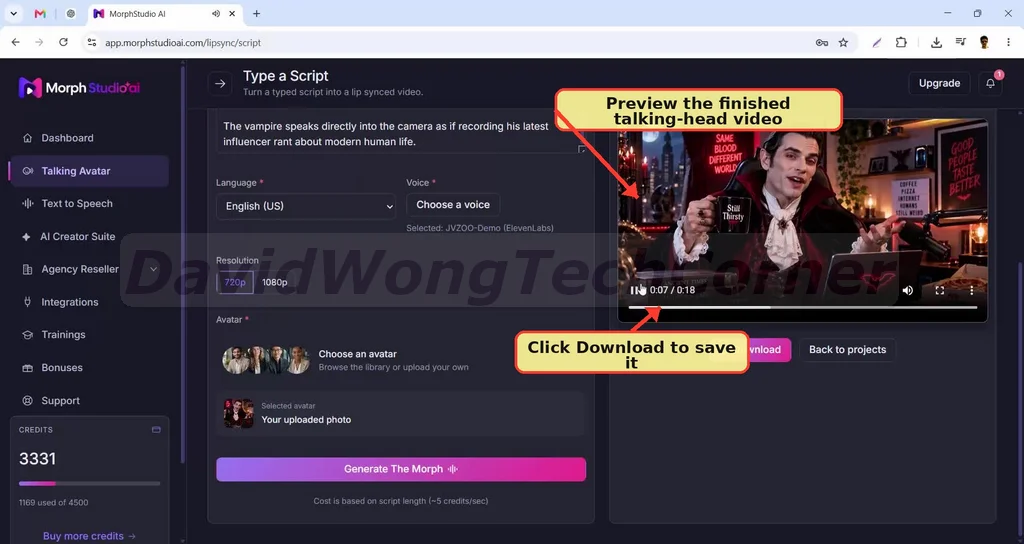
For a full walkthrough, please watch my review & demo video below:
MorphStudio AI Funnel Breakdown
FRONT END: MorphStudio AI Commercial ($37)
The MorphStudio AI front-end package gives you the core platform for creating realistic AI talking-head videos from photos, scripts, or existing audio.
What you get inside the front-end offer:
✅ AI Talking-Head Creator — Turn almost any photo into a human-like AI influencer or spokesperson.
✅ Script & Audio Video Generation — Create videos from written scripts or uploaded voice recordings.
✅ Pixel-Accurate Lip-Sync — Match speech with realistic mouth movements for a more believable presentation.
✅ Human-Like Animation — Add facial expressions, natural blinking, and subtle head movements automatically.
✅ Built-In + Custom Avatars — Choose from ready-made avatars or upload your own images.
✅ 10 Premium AI Voices — Access professional voices with adjustable voice controls.
✅ 10 Global Languages — Produce multilingual videos for audiences in different markets.
✅ Prompt-Based Performance Control — Direct your avatar’s speaking style, personality, and delivery using simple instructions.
✅ Up To 2-Minute Videos — Generate complete talking-head videos up to two minutes in length.
✅ Project & Render Management — Organize your projects, renders, and completed downloads from one place.
✅ 720p MP4 Downloads — Export finished videos in ready-to-use MP4 format at 720p resolution.
✅ 3,000 Video-Generation Credits — Get 3,000 credits included with your front-end access.
✅ Commercial License Included — Create videos for clients and charge for your services.
✅ Fast-Action Bonuses — Early buyers also receive additional bonuses during the launch period.
>>>Click here to buy MorphStudio AI front-end<<<
BUNDLE: MorphStudio AI Bundle Offer ($317 => $267)
Add my code “MSAI50” to get $50 off the Bundle.
The MorphStudio AI Bundle packages the front-end and all four upgrades together at a heavily discounted bundle price, making it the more cost-effective route for anyone who already wants access to the complete system.
You get the core talking-head video creator along with the Pro capabilities, Creative Suite, DFY avatar collection, and Agency Upgrade under one bundle deal.
The bundle includes:
🔰 Front-End: MorphStudio AI Commercial (currently priced at $37)
🔰 OTO #1: MorphStudio AI Pro (currently priced at $67)
🔰 OTO #2: MorphStudio AI Creative Suite (currently priced at $97)
🔰 OTO #3: MorphStudio AI DFY Avatars Collection (currently priced at $97)
🔰 OTO #4: MorphStudio AI Agency Upgrade (currently priced at $297)
🔰 The combined video creation, voice, language, avatar, script, rendering, and commercial tools included across the offers
🔰 Agency and reseller capabilities for users who want to work with clients or sell software access
🔰 Every exclusive bonus from every individual upgrade
>>>Click here to buy MorphStudio AI Bundle<<<
Now let’s check the details of each OTO offer:
OTO 1: MorphStudio AI Pro ($67 | One-time payment)
MorphStudio AI Pro expands the core platform with higher video quality, more voices and languages, longer video creation, faster rendering, and a larger credit allowance.
What you get inside OTO 1:
✅ 70+ Global Languages — Create localized talking-head videos for customers and clients across significantly more countries.
✅ 20 Additional AI Voices — Expand your voice library to 30 professional AI voices in total.
✅ ElevenLabs-Generated Voices — Bring voices created inside ElevenLabs into MorphStudio AI for additional voice options.
✅ Full HD 1080p Output — Upgrade from the front-end’s 720p resolution to sharper 1080p video for promotions, courses, presentations, and client campaigns.
✅ Priority Rendering — Process projects through a dedicated rendering queue for faster turnaround.
✅ More Natural Performances — Unlock improved MorphStudio performance, motion quality, and stronger identity consistency.
✅ Longer Videos — Go beyond the front-end’s two-minute video limit for longer reviews, explainers, tutorials, presentations, and sales videos.
✅ 6,000 Additional Credits — Generate more campaigns, language variations, test versions, and client videos.
>>>Click here to buy MorphStudio AI OTO 1<<<
OTO 2: MorphStudio AI Creative Suite ($67 | One-time payment)
The MorphStudio AI Creative Suite adds an AI-powered content creation layer to your workflow.
What you get inside OTO 2:
✅ Turn Ideas Into Ready-To-Record Scripts — Give your AI influencer a clear and engaging message without writing every script from scratch.
✅ Create Scripts For Every Campaign — Generate content for product demos, affiliate promotions, advertisements, webinars, sales videos, YouTube videos, Reels, and TikToks.
✅ Improve Existing Content — Rewrite, expand, shorten, and polish scripts to fit different campaigns or video lengths.
✅ Stronger Hooks, Headlines & CTAs — Generate attention-grabbing opening lines, headlines, and calls-to-action designed to keep viewers watching and encourage response.
✅ Better AI Influencer Performances — Generate and improve performance prompts covering expressions, motion, tone, and delivery.
✅ 2,000+ DFY Assets — Get access to more than 1,000 ready-made scripts, 500 hooks, and 500 calls-to-action.
>>>Click here to buy MorphStudio AI OTO 2<<<
OTO 3: MorphStudio AI DFY Avatars Collection ($97 | One-time payment)
The MorphStudio AI DFY Avatars Collection greatly expands the number of ready-made digital presenters available for your campaigns.
What you get inside OTO 3:
✅ 300+ Premium Done-For-You Avatars
✅ Avatars across 20 different categories
✅ Business & Corporate presenters, Doctors & Medical professionals, Lawyers, Teachers, Coaches, Real Estate presenters, Finance avatars, Technology personalities, Fashion & Lifestyle characters, Influencers, Podcast Hosts, Webinar Hosts, Customer Support representatives, Luxury presenters, Kids characters, Holiday-Themed avatars, Sales presenters, Fitness personalities
✅ And additional niche-specific avatar styles
>>>Click here to buy MorphStudio AI OTO 3<<<
OTO 4: MorphStudio AI Agency Upgrade ($247 | One-time payment)
The MorphStudio AI Agency Upgrade is designed for users who want to move beyond creating videos and turn the platform into a client-service or software-reselling business.
What you get inside OTO 4:
✅ Resell MorphStudio AI As Your Own Software — Sell access under your own business and keep 100% of every sale.
✅ Up To 50 Client Accounts — Create and manage as many as 50 separate client accounts.
✅ Done-For-You Sales Page — Use prepared sales materials to promote your offer.
✅ DFY Graphics — Get promotional graphics for your agency campaigns.
✅ Email Swipes — Use ready-made email copy to market your services or software offer.
✅ Proposal Templates — Present your services to prospective clients more professionally.
✅ Client Contracts — Get ready-to-use agreements for working with customers.
✅ Pricing Guide — Use included pricing guidance when packaging and selling your services.
✅ Client Onboarding Assets — Access materials designed to help you bring new customers into your agency workflow more smoothly.
>>>Click here to buy MorphStudio AI OTO 4<<<
FAQs – Things You Need To Know Before Deciding
1. Do I Need Any Video Editing Or Technical Experience?
Not at all. Simply choose or upload an avatar, add your script or audio, and let MorphStudio AI handle the talking-head video creation for you.
2. Do I Have To Face A Camera Or Record My Own Voice?
No. Paste your script and select an AI voice, or upload your own audio whenever you want to use an existing recording. You can create presenter-style videos without appearing on camera yourself.
3. Can I Upload My Own Photo?
Yes. Upload a clear photo in JPG, PNG, or WEBP format and turn it into an AI talking-head presenter. You can also choose from the built-in avatar library.
4. Which Languages Does MorphStudio AI Support?
The front-end includes 10 global languages, including English, Spanish, French, German, Italian, Portuguese, Japanese, Korean, Hindi, and Mandarin.
5. Can I Create And Sell Videos To Clients?
Yes. The included commercial license allows you to create talking-head promos, explainers, demos, social videos, and other marketing content for clients and charge for your services.
6. Are There Any Monthly Fees Or Usage Limits?
MorphStudio AI’s front-end is available for a one-time payment with no monthly subscription. Your front-end account includes 1,500 video-generation credits to create your videos.
7. Can I Turn An Existing Voiceover Into A Talking-Head Video?
Yes. Upload your existing voiceover and MorphStudio AI can animate your chosen avatar around it, giving your audio a realistic digital presenter without requiring you to record the video separately.
8. Which Audio File Formats Can I Upload?
MorphStudio AI supports MP3, WAV, M4A, AAC, FLAC, and OGG files. You can upload, replace, and preview your audio before generating the finished video.
9. How Long Can My Videos Be?
The front-end lets you generate talking-head videos of up to two minutes, making it suitable for social content, product pitches, short explainers, promotions, and other focused video campaigns.
10. What Video Quality Can I Download?
Front-end users can download completed videos as ready-to-use 720p MP4 files, making them easy to publish across websites, social platforms, landing pages, and marketing campaigns.
11. Can I Control How My AI Avatar Performs?
Yes. Use simple AI performance prompts to tell your avatar how to deliver the message, such as acting like a confident salesperson, friendly coach, teacher, CEO, or professional presenter.
12. Does MorphStudio AI Include Ready-Made Avatars?
Yes. The platform includes a collection of built-in AI avatars suitable for niches such as business, marketing, coaching, education, lifestyle, and more. You can use these directly or upload your own character.
13. Can I Adjust The AI Voice Before Creating My Video?
Yes. You can select the voice and language, adjust the speaking speed, and preview the result before generating your final talking-head video.
14. How Realistic Are The Avatar Movements?
MorphStudio AI combines lip-sync technology, facial expressions, eye blinking, subtle head movements, and stable face identity to create a more natural-looking talking-head performance throughout the video.
15. Do I Need A Powerful Computer To Render The Videos?
No. MorphStudio AI uses cloud-based rendering, so the heavy video processing happens online. You do not need expensive video hardware, large software installations, or a high-end editing computer.
👉 Click the button below to grab the MorphStudio AI front-end with the early bird discount:
👉 Click the button below to grab the MorphStudio AI Bundle with an instant $50 off:
Add my code “MSAI50” to get $50 off the Bundle.
Don’t forget to check out the handy bonuses that comes with MorphStudio AI. They pack a variety of tools that tackle different parts of the process, so you can move faster, get stronger results, and cover every gap in your workflow.
>Tap To See The Full Bonus Package And Claim Your Bonuses<
All bonuses are always available and delivered instantly inside your member area:
If you have any issues accessing them, please email davidwongbonus@gmail.com for fast support, and I will manually send everything to you.
