ProfitMaps AI Review
Make Money Helping Local Businesses?

What Is ProfitMaps AI?
ProfitMaps AI is an AI-powered local marketing platform that helps you discover businesses struggling with Google Maps visibility, reveal their ranking problems, and turn those opportunities into paying clients.
The software scans Google Maps rankings from multiple locations around a business, showing exactly where potential customers can find it and where competitors are winning instead.
It also gives you the tools to help businesses improve their local online presence, including:
▶ Google Maps Rank Scanning: Check local search rankings across different locations using visual map grids.
▶ Competitor Analysis: Discover which competitors dominate local search results.
▶ AI Action Plans: Generate practical recommendations to improve local visibility.
▶ Branded Reports: Share professional ranking reports featuring your business name and logo.
▶ AI Website & Content Creation: Create local business websites, Google Business Profile posts, and SEO-friendly articles.
▶ Lead Capture & Rank Tracking: Collect customer enquiries and monitor ranking changes over time.
How ProfitMaps AI works:
- Step 1: Choose A Local Business
Select a business listed on Google Maps, such as a restaurant, plumber, dentist, or beauty salon, and enter a relevant search keyword.
- Step 2: Run A Google Maps Scan
ProfitMaps AI checks the business’s ranking across multiple geographical points, generating a color-coded map that reveals where it ranks well, poorly, or doesn’t appear.
- Step 3: Generate The Report & Action Plan
Review competing businesses, identify ranking gaps, and generate an AI-powered improvement plan. Export the results as a branded PDF or shareable report link.
- Step 4: Approach Business Owners
Send the report to the business owner to highlight missed local search opportunities. Use those findings to start conversations and pitch your marketing services.
- Step 5: Deliver Services & Get Paid
Use the included website builder, AI content tools, and ranking tracker to support client projects. Charge for one-time improvements, ongoing local marketing, or monthly reporting services.
ProfitMaps AI Features At A Glance
ProfitMaps AI combines Google Maps ranking analysis, AI-powered marketing tools, and client acquisition features to help you find local business opportunities and turn them into profitable services.
Here’s what you get inside the platform:
✅ Google Maps Grid Scanner
Discover exactly where a local business appears in Google Maps search results. ProfitMaps AI scans multiple locations around the business and displays its rankings on a color-coded grid, making it easy to identify strong positions, weak spots, and areas where potential customers cannot find it.
✅ Local Competitor Analysis
See which competing businesses dominate Google Maps results in different areas. Compare their rankings against your target business to uncover opportunities for improving local visibility and attracting more customers.
✅ AI-Powered Action Plans
Turn ranking data into practical recommendations with AI-generated action plans. The software identifies potential improvements and creates a numbered task list covering areas such as Google Business Profile optimization, local content, and customer reviews.
✅ Professional Branded Reports
Convert your Google Maps scans into professional PDF reports featuring your company name and logo. You can also generate shareable report links to present ranking problems and improvement opportunities directly to business owners.
✅ AI Website Generator
Create professional local business websites using the integrated AI site planner and builder. Generate website pages, customize their content through the editor, and offer website creation as an additional service to your clients.
✅ Built-In Lead Capture System
Turn the websites you create into lead generation tools. Each site can collect customer enquiries through contact forms, with incoming leads organized inside a dedicated inbox for easier management.
✅ AI Google Business Profile Post Writer
Generate promotional posts and business updates for Google Business Profiles. Choose your post type, target keyword, and call to action, then let AI prepare relevant content for review and publication.
✅ AI Local SEO Article Writer
Create location-specific articles and service pages to support a business’s local search marketing. The AI generates content tailored to the business while highlighting claims that require verification before publishing.
✅ Keyword Research Tool
Enter a website and location to discover keywords the business already ranks for. Use these insights to identify relevant search opportunities and plan additional content or optimization services.
✅ Ranking History & Performance Tracking
Monitor how a business’s Google Maps visibility changes over time. Compare previous scans with newer results to identify ranking improvements, remaining weaknesses, and areas that require further attention.
✅ Automated Recurring Scans
Schedule Google Maps ranking scans to run automatically at regular intervals. This makes it easier to provide ongoing performance reports and offer monthly local SEO monitoring services without manually starting every scan.
✅ Spreadsheet Data Export
Download Google Maps ranking data and competitor information in CSV format. Analyze individual scan points, maintain client records, or prepare customized reports using your preferred spreadsheet software.
✅ AI Assistant Integration
Connect your own compatible AI assistant to ProfitMaps AI through MCP integration. This allows you to access supported platform tools and information through an AI-powered workflow.
✅ Local Business Finder (Gold & Platinum)
Discover potential clients by searching for businesses within a particular niche and location. The Business Finder includes business scores and filters that help identify companies with missing websites or weak online visibility, giving you a more targeted prospecting approach.
✅ Agency & Client Management Tools (Gold & Platinum)
Manage multiple client projects through dedicated workspaces. You can organize individual businesses, provide client portal access, and collaborate with team members while keeping each client’s information separate.
ProfitMaps AI Step-By-Step Software Walkthrough
Now, let me walk you through how to use ProfitMaps AI to analyze a local business, uncover valuable ranking opportunities, and turn those findings into a professional, search-friendly website.
The process starts with business research and continues through AI website generation, customization, and local SEO content publishing.
[+] Add A Local Business
Open Businesses and click Add business. Search for your target business, choose the correct Google Maps listing, and click SAVE to add it to your account.
[+] Confirm The Business Information
Check the business description, services, and contact information imported into the platform. Update any inaccurate details, then click Continue.
[+] Provide More Details About The Business
Complete Details that make it stand out with the business’s service areas, specialties, competitive advantages, and other helpful information. Click Continue when finished.
[+] Select Your Target Keywords
Review the suggested keywords under We recommend 5 keywords. Choose relevant phrases that describe the business’s services and target locations. You can also enter your own keywords.
[+] Analyze Google Maps Rankings
Click Scan rankings to analyze the business’s local search visibility. ProfitMaps AI checks its ranking positions across different locations and prepares the results for review.
[+] Discover Local Ranking Opportunities
Open Keywords and select a search term to examine its ranking map. Check Top 3, Average rank, and Best spot to identify geographic areas where the business needs better visibility.
[+] Generate An AI Website Strategy
Navigate to Site plan and click Create site plan. The software uses the business information and keyword analysis to prepare a website structure targeting relevant services and local searches.
[+] Examine The Suggested Website Structure
Review the AI-generated Sitemap to see the proposed homepage, service pages, and location-specific pages. Make sure the structure accurately reflects the business’s offerings and target markets.
[+] Build Your Business Website
Click Build this site to begin creating the website from your approved plan. Follow the website-building process to prepare the selected pages.
[+] Let AI Write The Website Content
Move to Words and allow the AI to prepare content for the website’s pages. The generated copy follows your site plan and covers the selected services, keywords, and locations.
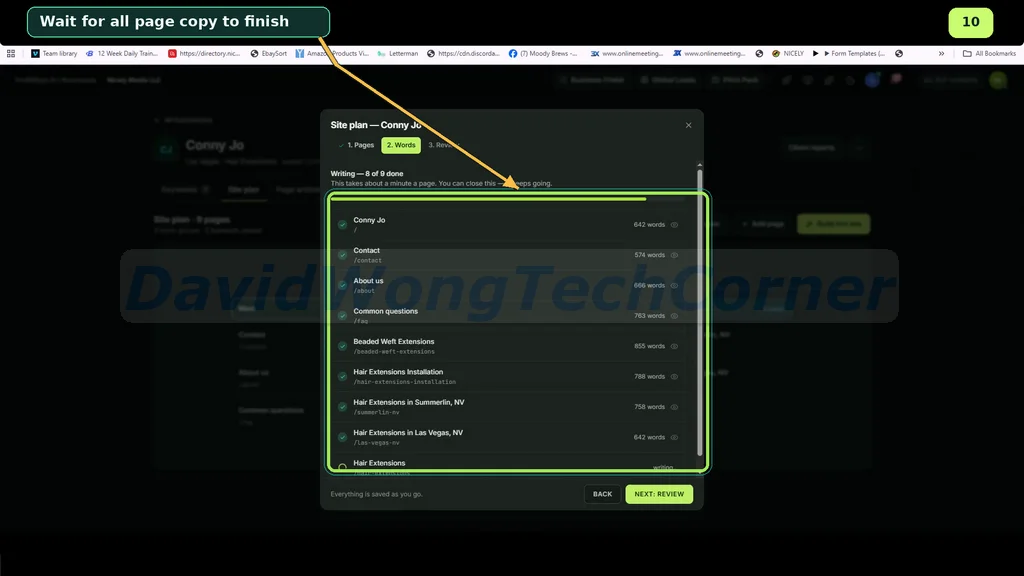
[+] Review The Website Before Completion
Click NEXT: REVIEW to examine the generated page structure and content. Check the business details and confirm that the website covers the intended services and locations.
[+] Open Your Newly Created Website
Once the website is ready, click VIEW YOUR SITE. Browse the generated pages to check the overall appearance, navigation, and business information.
[+] Inspect The Website Homepage
Look through the homepage and review its headline, service descriptions, navigation, and contact sections. Make sure visitors can quickly understand what the business offers.
[+] Customize The Website Design And Content
Open the website editor and select the sections you want to change. Adjust the text, headings, images, and other design elements to match the business’s branding. Click Publish update to apply your changes.
[+] Create A Location-Focused SEO Article
Return to the business dashboard and open Page articles. Start a new article and select the appropriate Target area to create content relevant to the business’s local audience.
[+] Enter Your SEO Keywords
Specify the Target keyword, choose Additional keywords, and provide any relevant instructions under Notes. Click Create article to generate the content.
[+] Review And Publish Your Article
Read through the AI-generated article and verify the business information, location references, and factual claims. Use Edit to make adjustments, then click Publish when everything is ready.
[+] Add The Article To Your Website
Click Add to website to include the published article as a new page on the business website.
[+] Check The Final Website Page
Open the updated website and inspect the newly added article. Confirm that its title, content, and navigation display correctly.
Your business website now includes pages informed by local keyword research, along with additional content targeting relevant search opportunities.
For the full walk through, please watch the video below:
ProfitMaps AI Funnel Breakdown
FRONT END: ProfitMaps AI ($37)
The ProfitMaps AI Front-End (Basic Edition) gives you access to the core tools for finding local business opportunities, analyzing Google Maps rankings, creating websites, and offering local marketing services.
What you get inside the front-end offer:
✅ 10 Business Projects – Analyze and manage up to 10 local businesses.
✅ 2 Keywords Per Business – Track two targeted search terms for each business.
✅ Google Maps Rank Scanner – Discover where businesses appear in local search results.
✅ Competitor Analysis – Identify competing businesses and uncover ranking opportunities.
✅ 5×5 Grid Scanning – Check rankings across 25 geographical points, with support for grids up to 9×9.
✅ 10 AI-Generated Websites – Create professional websites for local businesses.
✅ Built-In Lead Capture – Collect customer enquiries through forms on every website.
✅ AI Google Post Writer – Generate promotional content for Google Business Profiles.
✅ AI Article Writer – Produce location-specific content for local SEO campaigns.
✅ AI Site Planner – Plan website structures and content with AI assistance.
✅ AI Assistant Integration (MCP) – Connect compatible AI assistants to supported platform tools.
✅ 3-Day Hands-On Training Bonus – Learn how to use ProfitMaps AI through practical training.
✅ Google Business Profile Course Bonus – Discover strategies for improving local business visibility.
>>>Click here to buy ProfitMaps AI front-end<<<
BUNDLE: ProfitMaps AI Bundle Offer
ProfitMaps AI offers two bundle packages, Gold and Platinum, giving you access to the core software, advanced prospecting tools, white-label features, and agency capabilities in one package.
- Gold Bundle: $297
- Platinum Bundle: $697
Here’s the full breakdown:
|
ProfitMaps AI Gold Bundle ($297 One-Time) |
ProfitMaps AI Platinum Bundle ($697 One-Time) |
|
🔰 Front-End: ProfitMaps AI (currently priced at $37) 🔰 OTO #1: ProfitMaps AI Pro Version (currently priced at $67) 🔰 OTO #2: ProfitMaps AI Business Finder (currently priced at $97) 🔰 OTO #3: ProfitMaps AI Agency (currently priced at $147)
|
🔰 Front-End: ProfitMaps AI (currently priced at $37) 🔰 OTO #1: ProfitMaps AI Pro Version (currently priced at $67) 🔰 OTO #2: ProfitMaps AI Business Finder (currently priced at $97) 🔰 OTO #3: ProfitMaps AI Agency Plus (currently priced at $297)
|
Now let’s check the details of each OTO offer:
OTO 1: ProfitMaps AI Pro Version ($67 | One-time payment)
ProfitMaps AI Pro expands your account limits and unlocks additional branding and lead follow-up features.
What you get inside OTO 1:
✅ 50 Business Projects & 5 Keywords Per Business
✅ 50 AI-Generated Websites – Create up to 50 websites with built-in lead capture and lead inboxes.
✅ Complete White-Label Branding – Display your own logo, brand colors, and calls to action on reports and shared pages.
✅ Branded Client Emails – Send emails from your verified business domain without ProfitMaps AI branding.
✅ Automated Email Follow-Ups – Automatically follow up with new leads captured through your websites.
✅ Expanded Scan Credits – Get a larger credit allowance for Google Maps ranking scans.
✅ Up To 9×9 Grid Scanning – Analyze rankings across as many as 81 geographical points.
✅ All Basic Features Included – Keep everything from your front-end purchase within the same account.
>>>Click here to buy ProfitMaps AI OTO 1<<<
OTO 2: ProfitMaps AI Business Finder ($97 | One-time payment)
ProfitMaps AI Business Finder turns ProfitMaps AI into a targeted local client prospecting tool. Search for businesses in virtually any niche and location, uncover their online marketing weaknesses, and approach potential clients with ready-made reports or sample websites.
What you get inside OTO 2:
✅ 30 Monthly Business Searches
✅ Niche & Location Business Search – Discover local businesses based on your target industry and geographical area.
✅ Business Opportunity Scores – Evaluate prospects using a score from 0 to 99.
✅ Advanced Lead Filters – Find businesses with no website, no rankings, or scores below your chosen threshold.
✅ Lead Sorting & CSV Export – Organize, select, and download business prospect lists.
✅ One-Click Business Scanning – Add prospects to your account and launch detailed Google Maps ranking scans.
✅ One-Click Sample Websites – Generate private website previews for businesses on your list.
✅ Instant Report Sharing – Send ranking reports to potential clients to highlight improvement opportunities.
✅ Website Claim Pages – Let business owners claim their sample websites and submit order requests.
✅ Basic Edition Compatibility – Use Business Finder directly with your front-end account without purchasing Pro.
>>>Click here to buy ProfitMaps AI OTO 2<<<
OTO 3: ProfitMaps AI Agency ($147 – $297 | One-time payment)
ProfitMaps AI Agency is designed for freelancers, local marketing agencies, and service providers who want to manage multiple clients, deliver branded reports, and collaborate with team members.
This upgrade comes in two plans:
|
Plan 1: ProfitMaps AI Agency ($147) |
Plan 2: ProfitMaps AI Agency Plus ($297) |
|
✅ 10 Client Workspaces – Manage up to 10 client accounts with access to the complete toolkit. ✅ Client Window Portal – Give clients read-only access to their reports, completed work, and upcoming activities. ✅ 3 Team Member Accounts – Invite team members with Manager, Editor, or Viewer permissions. ✅ White-Label Reports & Portal – Display your own branding across reports, client emails, and the client portal. ✅ Custom Email Domain – Send branded client communications from your verified domain. ✅ No ProfitMaps AI Branding – Keep the software’s branding off shared pages, PDF reports, and client emails. ✅ Additional Agency Credits – Receive extra credits to support Google Maps scanning for client projects. >>>Click here to buy ProfitMaps AI Agency<<<
|
✅ Everything In Agency Plan 1 – Get all features from the standard Agency plan. ✅ Unlimited Client Workspaces – Manage client accounts without a fixed workspace cap, subject to fair use. ✅ Unlimited Team Members – Expand your team without a fixed seat limit, subject to fair use. ✅ Built-In Client Payments – Allow clients to pay for your services directly from their portals. ✅ Stripe Integration – Collect card payments through your own connected Stripe account. ✅ Agency Scan Credits – Receive credits to support your ongoing client campaigns. |
FAQs – Things You Need To Know Before Deciding
“I’ve never sold anything.”
You’re not selling on the first message. You’re sending a picture. The report explains the problem, and the messages above give you the words.
“I don’t know SEO.”
You don’t need to. The tool writes the next steps in plain English, and it writes the pages and posts too. You read them, check them and use them.
“What if the business already ranks well everywhere?”
Then you’ll know in a few minutes and can move on to the next one. A scan is just a way to start a conversation, and some businesses have nothing to fix.
“What if they say no?”
Then nothing is lost. Scan another business. Each scan is its own chance.
“Is the data real?”
Yes. The tool checks real Google Maps results at each point on the grid and shows the position at every spot.
“Do I need a website, followers or a big budget?”
No. You need the tool, a message app or email, and a few minutes a day.
“What if the owner says ‘I look fine when I search’?”
Many owners check from their own shop, where Google knows exactly who they are. The map checks from spots around town, like a stranger would. Message 4 above has the words.
“What if they ask for proof it works?”
Be honest: you can’t promise rankings. Show them the map today, do the work in the plan, then scan again next month so they can see any change for themselves.
👉 Click the button below to grab the ProfitMaps AI front-end with the early bird discount:
👉 Click the button below to grab the ProfitMaps AI Bundle with the early bird discount:
Don’t forget to check out the handy bonuses that comes with ProfitMaps AI. They pack a variety of tools that tackle different parts of the process, so you can move faster, get stronger results, and cover every gap in your workflow.
>Tap To See The Full Bonus Package And Claim Your Bonuses<
All bonuses are always available and delivered instantly inside your member area:
If you have any issues accessing them, please email davidwongbonus@gmail.com for fast support, and I will manually send everything to you.
