RocketToons AI Review
Build Cartoon Channels Without Drawing a Single Frame

What Is RocketToons AI?
RocketToons AI is an all-in-one AI cartoon creation software that turns a simple idea or script into a complete, animated cartoon episode, ready to share or sell.
Just type a sentence, and RocketToons AI handles the heavy lifting, from writing the storyline and designing characters to animating scenes, adding lifelike voices, lip-syncing dialogue, and creating background music.
With RocketToons AI, you can create:
▶ Animated Cartoon Shows & Series with consistent characters across episodes.
▶ Kids’ Stories & Nursery Songs for entertaining young audiences.
▶ Anime, 2D & 3D Cartoons in eight different animation styles.
▶ Educational & Bible Story Videos that bring lessons and storytelling to life.
▶ Marketing & Promotional Videos for products, businesses, and clients.
It also supports 40 AI voices, 25 languages, automatic captions, and HD video exports, giving you everything needed to produce professional-looking cartoons without animation experience or complicated editing software.
Creating your first cartoon takes just three simple steps:
- Step 1: Enter Your Idea
Type a short prompt or paste your existing script. RocketToons automatically develops the screenplay, complete with scenes, characters, and dialogue.
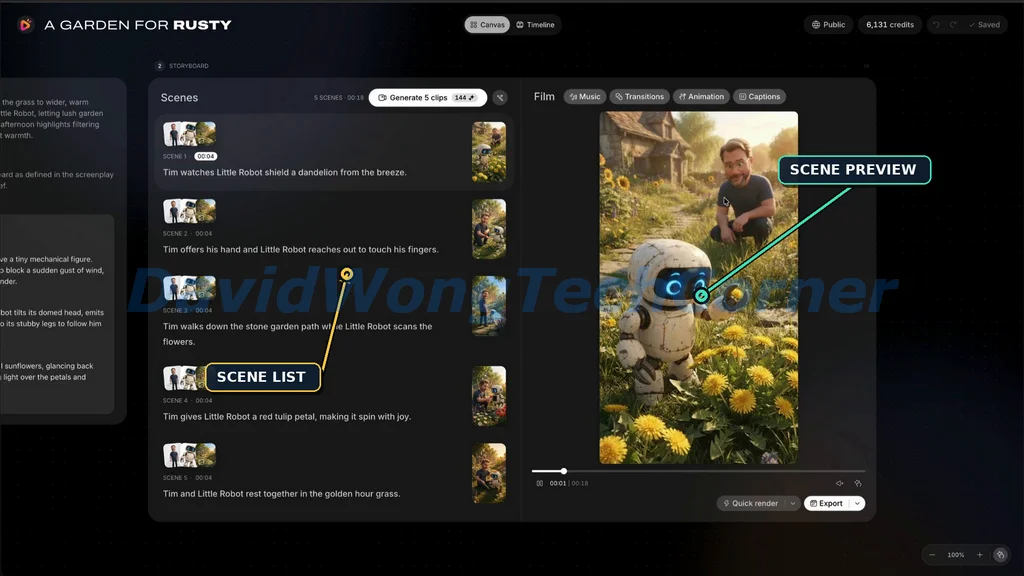
- Step 2: Review Your Storyboard
Preview each scene before animation begins. Customize the visuals, adjust dialogue, rearrange scenes, or regenerate individual shots until you’re happy with the results.
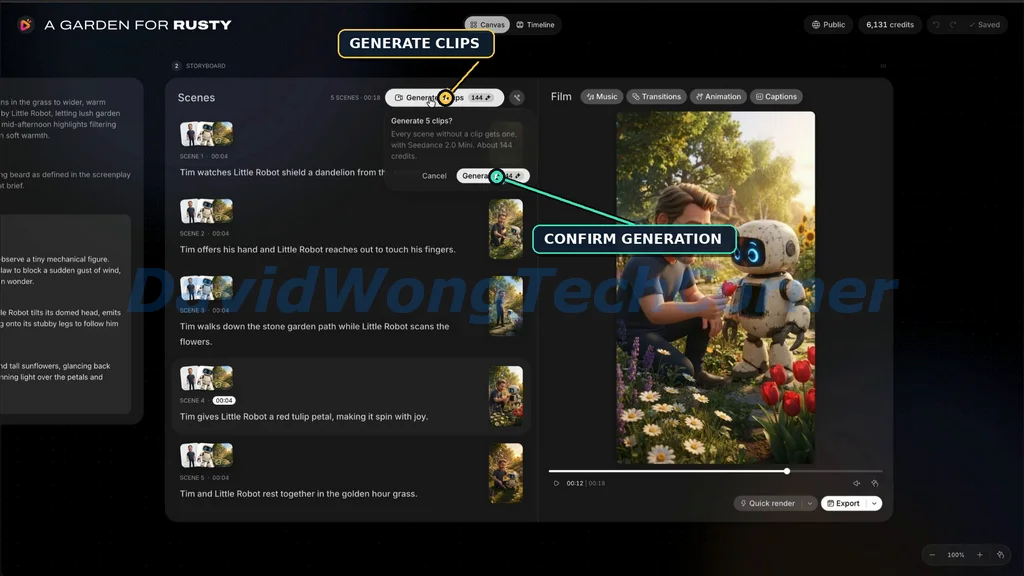
- Step 3: Generate & Publish
Let RocketToons bring everything together with animation, character voices, lip-syncing, and background music. Then download your finished HD cartoon or publish it directly to YouTube, Facebook, Instagram, or LinkedIn.
The best part? You can create entire cartoon episodes and recurring series without drawing a single frame, learning animation software, or hiring a production team.
RocketToons AI Features At A Glance
RocketToons AI packs an entire cartoon production studio into one platform, with powerful tools for creating, customizing, and publishing animated videos.
Here’s a closer look at its main features:
✅ AI Screenplay Generator
Turn a single idea or an existing script into a complete screenplay with structured scenes, character dialogue, and narration. Choose from 11 story formats, while the built-in prompt enhancer helps transform brief concepts into detailed, engaging stories.
✅ Consistent Characters, Scenes & Props
Create recognizable characters, locations, and props that maintain their appearance throughout your cartoons. RocketToons uses reference images to keep every detail consistent, even when you reuse the same characters across multiple episodes.
✅ Photo-to-Cartoon Creator
Transform photos of yourself, family members, pets, or products into animated characters and objects in any of eight available styles. Bring familiar faces into your stories or turn product images into recurring props for promotional videos.
✅ AI Storyboard Generator
Preview your entire cartoon as illustrated scenes before spending time on animation. Listen to the dialogue, review each visual, and make changes to the storyline, ensuring your episode looks and sounds the way you want.
✅ Full Creative Control & Scene Editing
Take the director’s seat with complete control over your cartoon’s creative details. Edit AI-generated prompts, dialogue, camera directions, and character actions, or regenerate individual scenes without having to recreate the entire video.
✅ AI Character Voices & Lip-Sync
Bring characters to life with 40 AI voices automatically assigned based on age and gender. RocketToons supports lip-syncing in 25 languages, while allowing you to correct and regenerate individual dialogue lines without affecting the rest of your animation.
✅ Storyboard-to-Animation Technology
Turn approved storyboard images into animated video clips while preserving their original appearance. Each image becomes the starting frame of its corresponding animation, helping your finished video stay true to the scenes you approved.
✅ AI Music Composer
Create original background music that matches the mood and action of each scene. Simply describe the atmosphere you want or let RocketToons analyze your story, then automatically blend the generated soundtrack with the character dialogue.
✅ Cartoon Series Builder & Cast Library
Build an entire animated series around your favorite characters. RocketToons saves your cast for future episodes, tracks their appearances, and even recommends new story ideas, making it easier to produce recurring content for YouTube and other channels.
✅ Faith-Based & Kid-Friendly Storytelling
Create animated Bible stories and family-friendly cartoons with dedicated storytelling features. The Faith Story format follows biblical narratives without introducing fictional twists, while the AI writer focuses on keeping content appropriate for younger audiences.
Additional Built-In Features
Beyond its main cartoon creation capabilities, RocketToons AI includes several helpful tools to streamline production and publishing.
✅ Eight Animation Styles
Choose from Pixar-style 3D, classic 2D, anime, claymation, comic book, and other animation styles to create cartoons that match your creative vision. Your selected style stays consistent throughout the video.
✅ Automatic Captions
Generate synchronized, word-by-word captions with highlighting effects. Choose between two caption styles or turn them off entirely.
✅ AI Background Score Library
Generate custom music from a short mood description or select from 38 built-in tracks to give your cartoons the perfect soundtrack.
✅ AI Prompt Enhancer
Expand short, basic ideas into detailed storytelling prompts with a single click. You can also use your own fully developed script without changing its original content.
✅ 88 Ready-Made Ideas & 26 Occasion Presets
Get started quickly with 88 creative story ideas and 26 occasion-based presets, including Christmas, Halloween, Mother’s Day, Diwali, Eid, and more.
✅ Voice-Preview Storyboards
Listen to every line of dialogue while viewing its corresponding storyboard image, allowing you to check character voices and narration before animation begins.
✅ Multiple Aspect Ratios
Create cartoons in 16:9 for YouTube, 9:16 for Shorts and Reels, or 1:1 for social media feeds, giving you flexibility across different content platforms.
✅ Flexible Scene Rewriting
Rewrite dialogue, add or remove scenes, rearrange your storyline, and provide editing instructions to the AI writer without starting your project from scratch.
✅ Camera Motion & Scene Transitions
Enhance your animated videos with zooms, pans, and nine scene transitions for smoother storytelling and more dynamic visuals.
✅ Safe Scene Regeneration
Experiment with different scene variations without losing your previous work. RocketToons saves your last six takes, allowing you to restore an earlier version whenever needed.
✅ One-Click HD MP4 Export
Download your completed cartoons as HD MP4 videos, ready for sharing, publishing, or delivering to clients.
✅ Direct Social Media Publishing
Publish your finished animations directly to YouTube, Facebook, Instagram, and LinkedIn without leaving the RocketToons dashboard.
RocketToons AI Step-By-Step Software Walkthrough
For a full walkthrough, please watch my review & demo video below:
RocketToons AI Funnel Breakdown
FRONT END: RocketToons AI ($37)
Apply Code “EARLYTOONS” for 10% Off
The RocketToons AI Front-End gives you access to the complete AI cartoon creation studio for a one-time payment, with no monthly subscription fees.
What you get inside the front-end offer:
✅ 1,000 AI Video Credits: Enough to create up to 50 short videos of up to 15 seconds each.
✅ 60 Days of Video Storage: Store your generated videos for up to 60 days.
✅ AI Cartoon Film Generator: Create complete animated cartoons from a single prompt or your own script.
✅ Photo-to-Cartoon Creator: Turn photos of real people, pets, and products into animated characters and props.
✅ Consistent Characters: Maintain recognizable characters, locations, and props across scenes and episodes.
✅ 8 Animation Styles: Pixar 3D, Classic 2D, Preschool 2D, Storybook, Ghibli, Action Anime, Comic Book, and Claymation.
✅ Custom Character & Scene Designer: Create characters, backgrounds, locations, and props that match your chosen style.
✅ AI Scriptwriter: Access 11 story formats, 88 ready-made ideas, and 26 occasion presets.
✅ Cartoon Series Builder: Reuse your cast, track episodes by character, and generate ideas for future episodes.
✅ Storyboard Preview: Review illustrated scenes and hear voiced dialogue before animation begins.
✅ 2 Animation Methods: Animate directly from approved storyboard images or character references.
✅ Advanced Scene Controls: Customize camera movements, character actions, sound effects, and clip duration.
✅ Character @Mentions: Place specific characters into any scene using simple @mentions.
✅ 40 AI Voices: Automatically assign natural-sounding voices to different characters.
✅ Dialogue Editing: Regenerate individual voice lines without recreating entire scenes.
✅ 25 Languages: Produce multilingual cartoons with character dialogue and lip-sync.
✅ 6 Saved Takes: Keep the last six versions of each shot and restore previous takes.
✅ Music & Visual Effects: Access 38 background tracks, nine transitions, zoom and pan effects, and two animated caption styles.
✅ 3 Video Aspect Ratios: Export in 16:9, 9:16, and 1:1 for different platforms.
✅ One-Click Social Publishing: Post directly to YouTube, Facebook, Instagram, and LinkedIn.
✅ Private Client Watch Pages: Share finished videos through private or unlisted viewing pages.
✅ HD MP4 Downloads: Export high-definition videos without watermarks.
✅ Commercial License: Create and sell animated cartoons to clients and businesses.
>>>Click here to buy RocketToons AI front-end<<<
BUNDLE: RocketToons AI Bundle Offer ($317 => $267 one-time)
Apply coupon “TOON50” at checkout for $50 OFF!
The RocketToons AI Bundle combines the front-end software and all five premium upgrades into one discounted package
The bundle includes:
🔰 Front-End: RocketToons AI Commercial (currently priced at $37)
🔰 Upgrade 1: RocketToons AI Elite (currently priced at $47)
🔰 Upgrade 2: RocketToons AI Pro (currently priced at $47)
🔰 Upgrade 3: RocketToons AI Studio (Boards) (currently priced at $37)
🔰 Upgrade 4: RocketToons AI Agent (MCP Connector) (currently priced at $37)
🔰 Upgrade 5: RocketToons AI Reseller (currently priced at $197)
🔰 6,000 credits instead of 1,000
🔰 Founders’ Pass: Every new feature, style and voice for 12 months; stays one-time when RocketToons goes monthly [Bundle only]
🔰 Lifetime storage + 10 team seats: Films stored for the life of your account; 10 users instead of 5 [Bundle only]
🔰 All 3 launch bonuses: Kids Pack, Bible Vault, Viral Shorts Library [Bundle only]
🔰 Live Agency Training call: Selling cartoon videos to clients: pricing, pitching, delivery
>>>Click here to buy RocketToons AI Bundle<<<
Now let’s check the details of each OTO offer:
Upgrade 1: RocketToons AI Elite ($47)
RocketToons Elite removes the standard film creation limit, extends video duration, and unlocks advanced publishing tools to help you produce and manage more cartoon content across multiple channels.
What you get inside Upgrade 1:
✅ 2,500 Bonus Credits: Additional credits for creating more animated content.
✅ Unlimited Cartoon Films: Remove the 50-film cap, with credit usage still applying.
✅ 15-Minute Cartoon Movies: Create longer animated films directly inside the editor.
✅ 180-Day Cloud Storage: Keep your completed films stored for longer.
✅ Multiple Social Channels: Connect multiple accounts on each supported platform.
✅ Content Calendar: Plan and schedule social media posts in advance.
✅ Batch Publishing: Distribute videos to multiple connected channels at once.
✅ Advanced Publishing Controls: Publish immediately, cancel scheduled posts, or retry failed uploads.
✅ AI Caption Writer: Generate social media captions in four different tones.
✅ Smart Hashtag Generator: Create platform-specific hashtags for your videos.
✅ Channel Analytics: Monitor video views and channel performance from one dashboard.
>>>Click here to buy RocketToons AI Upgrade 1<<<
Upgrade 2: RocketToons AI Pro ($47)
RocketToons Pro enhances video quality with premium AI rendering, cinematic editing tools, professional voiceovers, and advanced production features for creating more polished animated films.
What you get inside Upgrade 2:
✅ Pro Video Engine: Generate smoother animations, more consistent characters, and clips with built-in audio.
✅ Pro Image Quality: Produce sharper character designs and storyboard visuals.
✅ 6 Additional Cinematic Styles: Expand your animation options to 14 styles in total.
✅ 11 Hollywood-Style Transitions: Add professional scene transitions for a cinematic finish.
✅ 6 Premium Caption Styles: Create eye-catching animated captions for your videos.
✅ AI-Composed Soundtracks: Generate original background music tailored to each film’s mood.
✅ 30 Pro AI Voice Actors: Access premium voices with expressive delivery and global accents.
✅ Voiceover Studio: Convert any text into speech with precise word-level timing.
✅ Multi-Track Timeline Editor: Edit multiple video and audio tracks with frame-accurate control.
✅ Built-In Media Library: Organize and drag media assets directly into your timeline.
✅ 1080p HD Exports: Download full HD videos with selectable codec options.
✅ Priority VIP Rendering: Move your video projects ahead in the rendering queue.
✅ 5 Team Users: Give up to five users access to the same account for collaborative production.
>>>Click here to buy RocketToons AI Upgrade 2<<<
Upgrade 3: RocketToons AI Studio (Boards) ($37)
RocketToons Studio gives you a faster way to create standalone AI video clips, animate photos, and produce promotional content without building a complete cartoon storyboard first.
What you get inside Upgrade 3:
✅ Instant Text-to-Video: Generate animated clips from a single sentence without creating a storyboard.
✅ Photo-to-Video Animation: Bring product photos, portraits, illustrations, and other images to life.
✅ Video Extension: Extend existing clips while continuing the original action.
✅ Clip Chaining: Connect multiple clips into longer, continuous video sequences.
✅ AI Product Video Ads: Transform product images into animated advertisements using simple prompts.
✅ Saved Character Library: Reuse existing cartoon characters in standalone videos.
✅ Viral Content Creation: Produce reactions, memes, and talking-character videos in seconds.
✅ Custom B-Roll Generator: Create additional footage and cutaway shots for your main cartoon projects.
✅ 7 Directed Camera Styles: Choose Discovery, Comedy, Action, Suspense, Emotional, Transformation, or Showcase.
✅ 15-Second Video Clips: Create clips up to 15 seconds long in different aspect ratios.
✅ AI Model Selection: Choose your preferred AI model and video length for each clip.
✅ Saved Video Takes: Keep different generated versions and switch between them without additional charges.
✅ Flexible Export Options: Send finished clips directly to your editing timeline or download them as MP4 files.
>>>Click here to buy RocketToons AI Upgrade 3<<<
Upgrade 4: RocketToons AI Agent (MCP Connector) ($37)
RocketToons AI Agent connects your cartoon creation platform with ChatGPT, Claude, and other compatible AI agents, allowing you to manage video production through simple chat commands.
What you get inside Upgrade 4:
✅ ChatGPT & Claude Integration: Control RocketToons directly from supported AI assistants.
✅ AI Script & Story Creation: Write complete cartoon scripts and storylines through chat conversations.
✅ Character & Scene Design: Generate characters, locations, and props using natural-language commands.
✅ Automated Scene Prompts: Create detailed video prompts for individual scenes.
✅ Chat-Based Storyboard Builder: Generate, review, and edit storyboards without opening the main editor.
✅ On-Demand Video Rendering: Render animated clips and storyboard shots using chat instructions.
✅ Instant Take Switching: Change between saved video versions directly from your AI assistant.
✅ Chat-Controlled Publishing: Export completed films and schedule social media posts through chat.
✅ Credit Cost Protection: Review estimated credit costs and available balances before running each job.
>>>Click here to buy RocketToons AI Upgrade 4<<<
Upgrade 5: RocketToons AI Reseller ($97 – $197)
RocketToons Reseller allows you to sell access to the platform under a reseller license, giving you an opportunity to build your own software business and keep 100% of the profits from your sales.
Pricing options:
- $97 One-Time: Resell up to 25 client accounts.
- $197 One-Time: Resell up to 100 client accounts.
What you get inside Upgrade 5:
✅ 25 or 100 Client Accounts: Choose a reseller package that lets you sell access to 25 or 100 customers.
✅ 100% Profit Retention: Keep all revenue generated from selling your allocated client accounts.
✅ Dedicated Reseller Dashboard: Create, manage, and organize customer accounts from one convenient interface.
✅ Full Reseller License: Get the rights to resell RocketToons access to your customers.
>>>Click here to buy RocketToons AI Upgrade 5<<<
FAQs – Things You Need To Know Before Deciding
1. Do I need any animation or design skills?
No. Simply enter an idea or paste your script, and RocketToons AI handles the storytelling, scene creation, character voices, background music, and animation. You can create complete cartoons without any technical or design experience.
2. Is RocketToons AI a one-time payment?
Yes. RocketToons AI is available for a one-time payment during its launch promotion. There are no monthly subscription fees for the plan you purchase.
3. How do credits work?
The Commercial plan includes 1,000 AI video credits, enough for up to 50 short videos of 15 seconds each. The Bundle provides 6,000 credits, enough for up to 300 short videos of the same length. Credits depend on video duration, and you’ll see the estimated cost before generating anything.
4. Can I sell the videos I make?
Absolutely! Every plan includes a commercial license, allowing you to create and sell animated videos to clients, local businesses, or content creators while keeping 100% of your earnings.
5. Will my characters look the same in every scene?
Yes. RocketToons saves your characters, locations, and props in a reusable library, ensuring they maintain a consistent appearance across different scenes and future episodes.
6. Can I see the video before it animates?
Yes. RocketToons generates a visual storyboard with voiced dialogue before animation begins. You can review scenes, change dialogue, rearrange shots, and approve everything before generating the final animation.
7. Which languages can my characters speak?
RocketToons supports 25 languages, allowing you to create multilingual cartoons with AI voices, synchronized dialogue, and subtitles. Character voices can also be assigned automatically based on age and gender.
8. Where can I post my cartoons?
You can download watermark-free HD MP4 videos in 16:9, 9:16, or 1:1 formats. RocketToons also supports direct publishing to YouTube, Instagram, Facebook, and LinkedIn.
9. Do I need to install anything?
No. RocketToons AI is completely browser-based and works on both Windows and Mac. Simply log in to your account and start creating.
10. What’s the difference between Commercial and the Bundle?
The Commercial plan includes the core cartoon creation studio, 1,000 credits, and commercial rights. The Bundle adds all available upgrades, increases your allowance to 6,000 credits, and includes three exclusive launch bonuses at a discounted package price.
11. What if RocketToons AI isn’t right for me?
Your purchase is backed by a 30-day money-back guarantee. If you’re not satisfied, contact the support team within 30 days to request a full refund.
12. How do I get help?
RocketToons provides customer support along with step-by-step training videos to help you learn the platform, create your first cartoon, and make the most of its features.
👉 Click the button below to grab the RocketToons AI front-end with the early bird discount:
Apply coupon “EARLYTOONS” at checkout for 10% OFF!
👉 Click the button below to grab the RocketToons AI Bundle:
Apply coupon “TOON50” at checkout for $50 OFF!
Don’t forget to check out the handy bonuses that comes with RocketToons AI. They pack a variety of tools that tackle different parts of the process, so you can move faster, get stronger results, and cover every gap in your workflow.
>Tap To See The Full Bonus Package And Claim Your Bonuses<
All bonuses are always available and delivered instantly inside your member area:
If you have any issues accessing them, please email davidwongbonus@gmail.com for fast support, and I will manually send everything to you.
