Traffic Magnets Review
Build Traffic Tools, Grow Your Website, and Monetize More Search Visitors

Traffic is the part most marketers struggle with.
Getting people to your site often takes time, constant effort, and in many cases, more budget than most beginners want to spend. Because of that, I’m always interested in tools that approach traffic from a smarter and more scalable angle.
Traffic Magnets caught my attention for exactly that reason.
As a marketer, I’m always testing new ways to bring in visitors and grow online visibility, so I wanted to take a closer look at what this software offers and why it is getting attention. When a tool is built around solving a real traffic problem, it is worth reviewing properly.
In this Traffic Magnets review, I’ll go through the key things you need to know so you can decide whether it fits your own traffic strategy.
What Is Traffic Magnets?
Traffic Magnets is a software app that lets you create interactive tools like calculators, widgets, and generators that can pull targeted traffic from Google. These tools solve quick problems, match specific searches, and can keep bringing in visitors over time. That makes them more than just useful website add-ons. They can become real traffic assets.
This Traffic Magnets software helps you build those tools so you can grow organic traffic without depending so much on blog posts, paid ads, or daily promotion. You also get a better chance to attract focused visitors because these tool pages often line up with clear search intent.
In short, it is about turning small online tools into a practical traffic and monetization strategy.
Traffic Magnets Features At A Glance
Let’s take a closer look at the software’s key features:
✅ AI Traffic Opportunity Finder
Looks through your niche and pulls up 12 tool opportunities with strong potential. Each one is rated based on likely traffic, buyer intent, and earning potential, so you can spot better opportunities faster.
✅ One-Click Blueprint Generator
Gives you a full action plan for the tool you want to create. You get the search angle, the logic behind the tool, and the best monetization direction, all laid out for you.
✅ Blueprint A/B Variation Builder
Creates two different versions of the same tool strategy so you can compare angles before moving ahead. That gives you a clearer starting point and helps you make better decisions early.
✅ Traffic Magnet Tool Builder
Lets you create interactive calculators, widgets, and generators that are built to attract search traffic. You can also embed them on other websites, which adds more ways to get visibility.
✅ One-Click Landing Page Builder
Generates a ready-to-publish page for each tool, so you can get it live quickly without touching code or dealing with technical setup.
✅ Built-In Monetisation
Supports the income side of the strategy by making these traffic pages suitable for ad monetization. You can start with AdSense and grow into stronger ad platforms as your traffic increases.
✅ Traffic Training
Shows you how the method works so you are not just clicking buttons without understanding the bigger picture. Helpful for learning how to turn simple tools into repeatable traffic assets.
✅ Custom Tool Creator
Lets you describe any tool idea in normal everyday language, then the AI creates it for you. You can keep refining it until it matches what you want.
✅ Bulk Niche Idea Generator
Helps you generate 100 tool ideas in one click, which is useful when you want to plan ahead and build out a bigger traffic strategy for the months ahead.
✅ 9 Done-For-You Niche Templates
Comes with ready-made niche starting points, giving you a faster way to begin without staring at a blank screen or trying to plan everything from scratch.
✅ A/B Testing and Conversion Tracker
Allows you to test different versions of your tools and track which ones get better engagement or stronger conversion performance.
✅ Smart AI Recommendation Dashboard
Gets smarter over time by learning from your niche choices and activity, then keeps suggesting stronger opportunities you may want to build next.
✅ Full Data Export
Lets you export your ideas, blueprints, and asset names whenever you want, so you stay in control of the work you create.
Traffic Magnets Step-By-Step Software Walkthrough
In this part, I’m going to walk you through the real workflow inside Traffic Magnets, from finding tool opportunities to building one and adding it to your site so it can start pulling in search traffic.
Step 1: Connect Your API Key
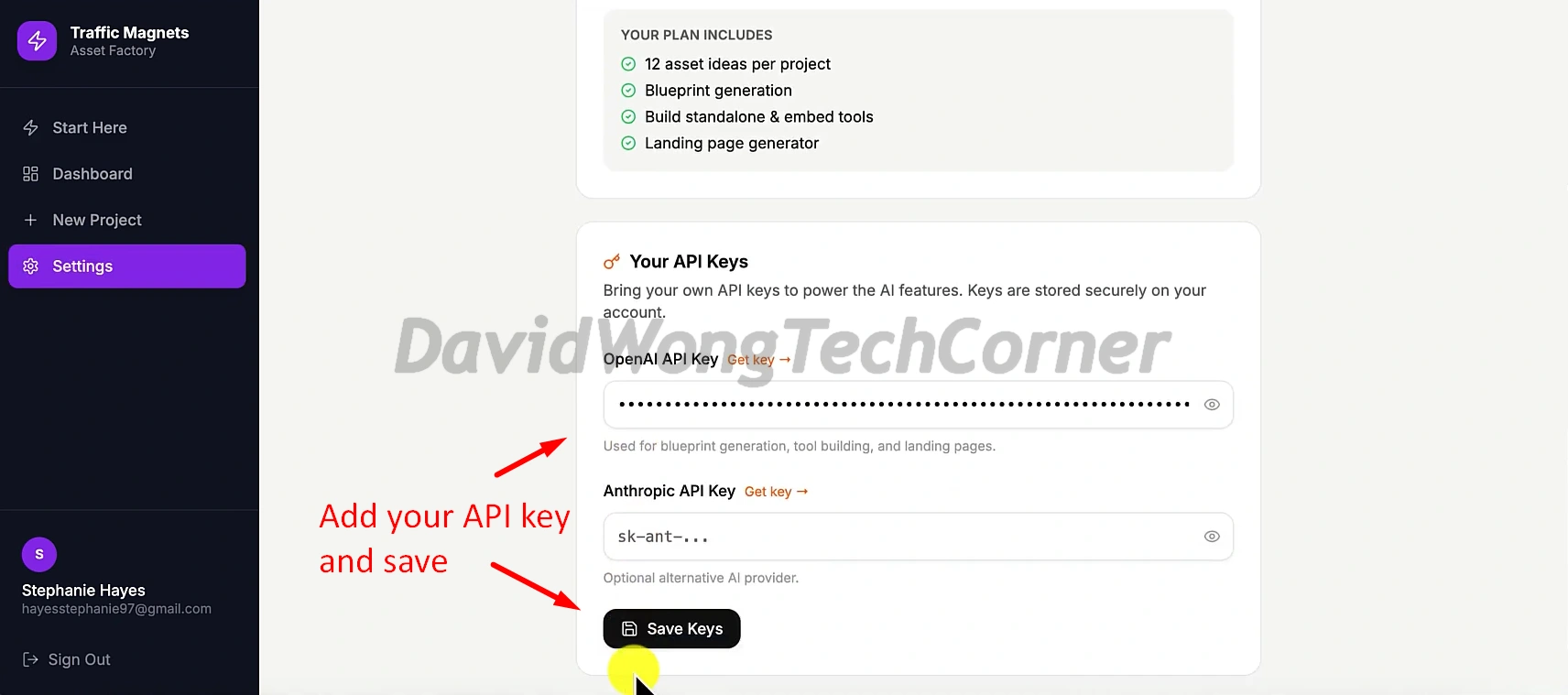
When you land on the Start Here page, the software guides you through the setup process. The first thing you need to do is add your API key so the AI can handle idea discovery, blueprint generation, and tool creation.
Then head over to Settings, paste your OpenAI API key, and click Save Keys. After that, the platform is ready to use its AI features:
Step 2: Launch Your First Project
Once the setup is complete, click Create My First Project. This is where you tell the system which niche you want it to work on:
Step 3: Pick a Template or Enter Your Own Niche
On the project setup page, you can either start with one of the built-in niche templates such as SEO, affiliate marketing, SaaS, real estate, health, finance, or e-commerce, or you can enter your own niche manually:
If you prefer to create your own setup, just enter your niche, project name, and main goal. For instance, you can choose goals like getting more traffic, capturing leads, or boosting engagement, then click Discover Traffic Magnets:
The system will then return 12 tool ideas based on the niche you entered. These appear as different asset types like calculators, planners, evaluators, and similar tool concepts, each with traffic and monetization scores to help you identify the strongest options faster:
Step 5: Select One Idea and Build the Blueprint
Click on any tool idea you want to move forward with, and a panel will open on the right side. From there, hit Generate Blueprint to expand that idea into a fuller tool setup:
Once the blueprint is finished, you’ll see three key areas: Blueprint, Variations, and Landing Page. These sections let you review how the tool is structured, look at alternate versions, and prepare the page that will host it:
Inside the landing page section, you can pick the style of the tool and choose the publishing format. You can make it a standalone page or turn it into an embeddable widget to place on your current site:
Step 6: Put the Tool Live on Your Website
When the widget version is finished, the platform confirms that the embed is ready. At that point, click Copy Embed Code so you can insert the tool into your website:
After you paste the code into your site, the tool shows up live and can be used immediately by your visitors. In this example, the calculator is already active and ready for people to enter numbers and get their result:
That is the main Traffic Magnets process from start to finish. You choose a niche, uncover tool ideas, build one, and publish it on your site so it can become another searchable traffic asset from Google.
For a full walkthrough, please watch my review & demo video below:
Traffic Magnets Funnel Breakdown
FRONT END: Traffic Magnets ($47)
The front-end gives you the core system for finding tool opportunities, creating interactive traffic tools, publishing them, and building a traffic strategy around search-driven assets. It is the main offer for anyone who wants to create calculators, widgets, and generators that can attract visitors and open the door to monetization.
What you get inside the front-end offer:
>>>Click here to buy Traffic Magnets front-end<<<
BUNDLE: Traffic Magnets Bundle Offer ($297)
Add code “‘magnets’” to get $30 Off
This is the best option for buyers who want the full Traffic Magnets system, all upgrades, and the strongest overall value without having to piece everything together separately.
The bundle includes:
🔰 Front-End: Traffic Magnets (currently priced at $37)
🔰 OTO #1: Traffic Magnets Custom GPT Builder (currently priced at $17)
🔰 OTO #2: Traffic Magnets Unlimited (currently priced at $77)
🔰 OTO #3: Traffic Magnets Agency (currently priced at $127)
🔰 OTO #4: Traffic Magnets Reseller (currently priced at $197)
>>>Click here to buy Traffic Magnets Bundle<<<
OTO 1: Traffic Magnets Custom GPT Builder ($17)
This upgrade helps you get more value from the traffic you generate. It adds a custom AI assistant around every tool, so visitors can ask questions, stay engaged longer, and move more naturally toward your offers. It is a smart add-on for anyone who wants to turn tool traffic into more clicks, leads, and sales.
What you get inside OTO 1:
✅ Custom GPT Builder software
✅ Ready-to-deploy GPT instructions
✅ GPT setup tailored to your tool and niche
✅ Interactive AI layer for each tool
✅ No prompt engineering required
✅ Fast copy-and-paste setup
✅ Works across all Traffic Magnets tools
✅ Supports all niches
✅ More engagement and longer time on page
✅ Better conversion potential
>>>Click here to buy Traffic Magnets OTO 1<<<
OTO 2: Traffic Magnets Unlimited ($77)
This upgrade removes the cap and gives you room to scale much further. Instead of being limited to a smaller number of tools, you can build as many calculators, widgets, generators, and traffic pages as you want. It also adds testing features that help you optimize performance as your library grows.
What you get inside OTO 2:
✅ Unlimited calculators, unlimited generators, unlimited widgets and utilities, and unlimited traffic pages
✅ No monthly fees
✅ No per-tool charges
✅ Split testing features
✅ A/B rotating widgets
✅ More room to scale across multiple niches
✅ Better long-term traffic growth potential
>>>Click here to buy Traffic Magnets OTO 2<<<
OTO 3: Traffic Magnets Agency ($67 – $97 – $197)
This upgrade is for users who want to turn the software into a client service business. It gives you agency access, client account management, and the ability to handle multiple business accounts from one place. It is a strong fit for freelancers, marketers, and anyone who wants to offer traffic-building services to local businesses or clients.
What you get inside OTO 3:
✅ Agency access
✅ Multi-level sub-accounts
✅ Central dashboard for client management
✅ Account options for 50, 100, or 250 clients
✅ Client management system
✅ Built for recurring service income
✅ Good fit for local business traffic offers
✅ Easier service delivery at scale
✅ Scalable agency model
>>>Click here to buy Traffic Magnets OTO 3<<<
OTO 4: Traffic Magnets Viral Content Pilot ($197)
This final upgrade is about lead capture. It helps you turn visitors into subscribers by adding a simple opt-in system to your tools, pages, and content. Rather than letting traffic come and go, you can start building an email list you own and can monetize later.
What you get inside OTO 4:
✅ Viral Content Pilot software access
✅ Viral Link gating system
✅ One-click Google sign-in
✅ Verified email capture
✅ Works with all Traffic Magnets tools
✅ Turns visitors into owned leads
✅ No separate funnel builder needed and no complicated integrations
✅ Setup in under 60 seconds with no tech skills required
>>>Click here to buy Traffic Magnets OTO 4<<<
FAQs – Things You Need To Know Before Deciding
Don’t forget to check out the handy bonuses that comes with Traffic Magnets. They pack a variety of tools that tackle different parts of the process, so you can move faster, get stronger results, and cover every gap in your workflow.
>Tap To See The Full Bonus Package And Claim Your Bonuses<
All bonuses are always available and delivered instantly inside your member area. If you have any issues accessing them, please email davidwongbonus@gmail.com for fast support, and I will manually send everything to you.
